
Matcha Filter Removal with Rayopix
Rayopix is a Image Editing tool that reconstructs natural color and texture in photos altered by the matcha filter effect. Selfie and portrait photographers use Rayopix to rebuild facial structure and hair detail from a single saved image. Rayopix handles still portraits and pets well, while heavily degraded or resized screenshots still need manual retouching.
What Rayopix Does
Rayopix takes one matcha-filtered photo and outputs a reconstructed version at 1K, 2K, or 4K resolution in about a minute.
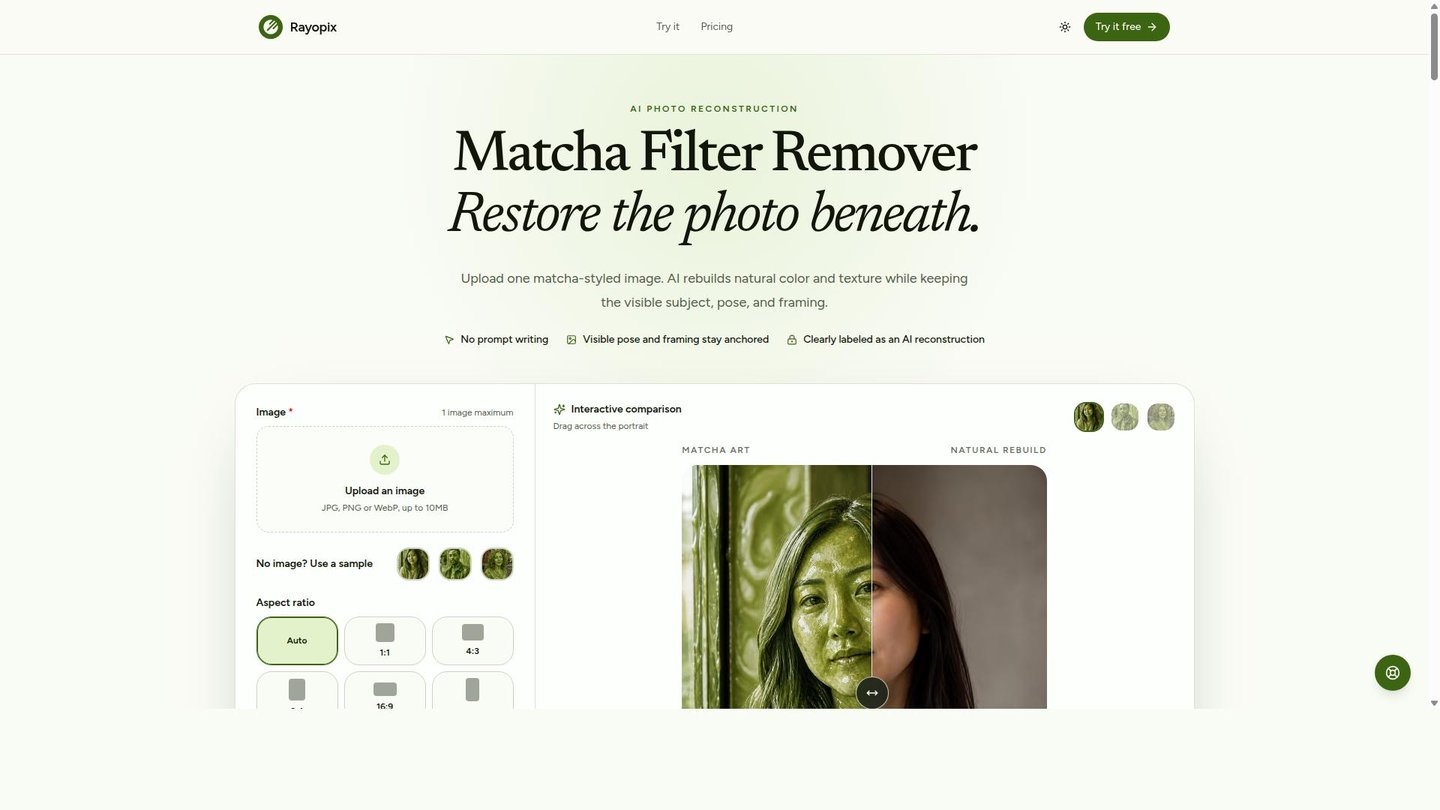
The matcha effect redraws skin, hair, clothing, and backgrounds as glossy liquid art, so a fix has to rebuild those surfaces rather than shift a color slider. Rayopix targets the green cast and illustrated finish while using the visible pose and framing as a guide, then re-renders the frame with photographic light and depth. Users pick source, shape, and resolution; the reversal instruction runs automatically without manual prompting.
Main Features
AI Photo Reconstruction
Rayopix rebuilds natural color and texture in matcha-filtered photos while preserving the original subject, pose, and framing. The model replaces glossy matcha swirls with photographic cues such as skin texture, individual hair strands, and fabric. Because the reversal logic is built in, users only choose source, shape, and resolution rather than writing prompts.
Selectable Output Resolution
Rayopix lets users choose 1K, 2K, or 4K output, with each tier costing more credits per the pricing table. Higher resolutions demand more detail reconstruction, which is why they consume more of a purchased pack. This ties spend directly to the fidelity a specific photo or platform actually needs.
Before-and-After Comparison
A drag divider shows the matcha original against the reconstructed result side by side. Users keep the output when identity and structure look right, or adjust settings and rerun the reconstruction. This makes the reconstruction step verifiable before a credit spend is treated as final.
Multi-Format Support
Rayopix accepts JPG, PNG, or WebP files up to 10MB and supports aspect ratios including 1:1, 4:3, 3:4, 16:9, and 9:16. This covers saved photos and exported TikTok stills without requiring a format conversion step beforehand, which keeps the upload workflow to a single file selection.
Use Cases
-
Restoring selfies and portraits
Selfie and portrait photographers upload a matcha-filtered face shot to Rayopix. The AI Photo Reconstruction feature rebuilds facial structure and hair strands from the visible pose. The result is a clearer, more natural-looking portrait ready to reuse.
-
Reconstructing couple and group photos
Photographers and social media users bring group or couple shots distorted by the matcha effect. Rayopix rebuilds people placement and individual detail across the full frame using the same reconstruction model. The output keeps the original composition intact.
-
Restoring pet photos
Pet owners and pet photographers use Rayopix to reverse the green matcha cast on fur and coat color. The model rebuilds coat texture instead of just adjusting hue. This preserves the pet’s actual appearance rather than a liquid-art approximation.
Best For / Not For
Rayopix is built for people who have a single matcha-filtered photo and want a natural-looking reconstruction without manual editing.
Selfie and portrait photographers, photographers and social media users handling couple or group shots, and pet owners and pet photographers are the named audiences for this tool.
Rayopix is best suited only for still images with a recognizable subject and visible composition, and it does not publicly document integrations with third-party editing software, so teams needing a plugin-based batch pipeline should look elsewhere.
Pricing
Rayopix sells four one-time credit packs with no subscription: Mini at $5 / one-time for 42 credits, Plus at $12 / one-time for 108 credits, Max at $25 / one-time for 240 credits, and Ultra at $49 / one-time for 480 credits.
| Plan | Price | Included |
|---|---|---|
| Mini | $5 / one-time | 42 credits |
| Plus | $12 / one-time | 108 credits |
| Max | $25 / one-time | 240 credits |
| Ultra | $49 / one-time | 480 credits |
Credits never expire and one photo costs 3, 5, or 8 credits at 1K, 2K, or 4K resolution, so a larger pack simply stretches further across resolutions rather than unlocking new features.
Pricing checked 2026-09-27.
Quick Comparison
AI Image Cleaner is Rayopix’s main alternative for general photo cleanup and restoration tasks. AI Image Cleaner focuses on broad blemish and noise removal across everyday photo types. Rayopix specializes in reversing the matcha filter’s liquid texture and green cast through its AI Photo Reconstruction model. Choose AI Image Cleaner if the job is general photo tidying unrelated to a filter effect. Choose Rayopix if the photo was specifically altered by the viral matcha filter.
Verdict
Rayopix reconstructs a matcha-filtered photo at 1K, 2K, or 4K resolution, with the Mini pack priced at $5 / one-time for 42 credits. It fits selfie, portrait, and pet photo fixes best, and less so batch or heavily degraded images.