Palette: AI Photo Colorization for Families
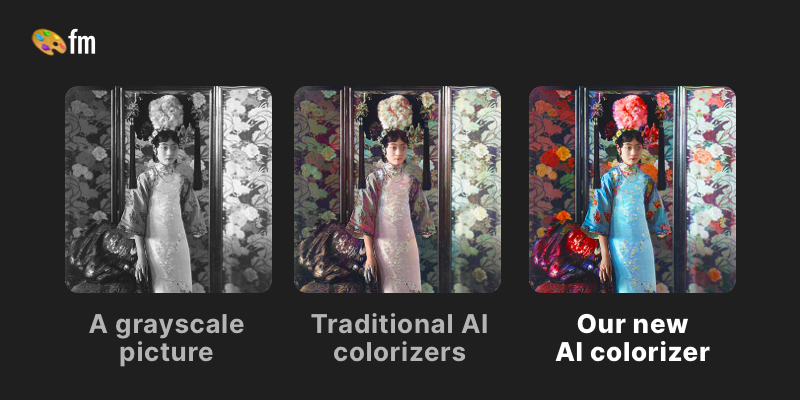
Palette works as an Image Editing tool for families, turning scanned black-and-white photos into colorized versions. Families use Palette to upload old photos and apply color filters to bring them to life. Palette handles quick previews well, while archival-accuracy work still needs manual retouching.
- United States 24.3%
- Russia 9.8%
- Mexico 7.5%
- India 7.3%
- Other 51.1%
What Palette Does
Palette turns an uploaded black-and-white photo into a colorized version by running it through an AI model with 21+ selectable color filters.
Users upload one or several images, preview unlimited color variations before paying, and choose keyword-based adjustments for specific elements like clothing or skies. Palette processes requests quickly, so a batch of family photos can be reviewed and exported in one sitting instead of being colorized by hand frame by frame. Output resolution and watermark removal depend on available credits.
No API or desktop client is listed; the workflow runs entirely through the browser, from upload to export.
Main Features
21+ Color Filters
Palette applies more than 21 preset color treatments to a single uploaded photo, each producing a distinct tone and palette for skin, sky, and clothing. Users switch between filters in the same session without re-uploading the image. This gives families a way to compare several color styles side by side before committing a credit to a final, watermark-free export.
Unlimited Color Previews
Palette generates unlimited low-resolution, watermarked previews on the free trial before any credit is spent. Previews render at reduced resolution, which keeps testing free but means the final high-resolution file still requires a paid credit. This separates open-ended experimentation with filters from the one-time decision to pay for a clean, printable copy of a chosen photo.
Batch Upload
Palette accepts multiple photos in a single upload instead of processing one image per session. Each photo in the batch can still receive its own filter and keyword adjustments independently of the others. This matters for anyone digitizing a stack of family prints at once, since the whole set moves through preview and export together rather than one photo at a time.
Watermark-Free Downloads
Palette removes the watermark and delivers a full-resolution file once a credit is applied to an image. Free previews always carry a watermark and lower resolution by default. Sharing or printing a clean copy therefore requires either the one-time credit pack or the annual subscription, since the free trial alone cannot produce a finished, shareable export.
Use Cases
-
Colorizing old photos
Families scanning inherited black-and-white prints can upload them into Palette and apply color filters to restore a sense of life to the images, previewing results before spending a credit on the final export.
-
Reviewing multiple filter styles before export
A family preparing photos for a reunion slideshow can cycle through Palette’s 21+ filters on one image at no cost, since previews are unlimited, then settle on a single treatment before paying.
-
Batch-processing a photo album
A family digitizing a full album can upload several scans together in Palette instead of handling them one by one, with each photo keeping its own filter choice through export.
Best For / Not For
Palette is built for people restoring personal, non-commercial photo collections rather than professional archival pipelines.
Families colorizing inherited black-and-white prints are the named audience, typically working with a handful to a few dozen scanned images at a time rather than large digitized archives.
Palette does not publicly document integrations with third-party software or an API for custom workflows, and free outputs stay low-resolution and watermarked until a credit is spent, which rules it out for teams needing automated, large-scale batch pipelines.
Pricing
Palette’s standard paid options are a $49 one-time payment for 75 credits or a $72-per-year subscription billed annually, alongside a free trial with one credit.
| Plan | Price | Included |
|---|---|---|
| Free Trial | Free | 1 free trial credit, Unlimited color previews, Over 21 color filters, Watermark on previews, Lower resolution, Ads & Promotions |
| One-time payment | $49 | 75 credits once, Available for 2 years, Limited Ads, All free benefits |
| Most Popular | $72 / year, billed annually | 480 credits per year, Watermark-free previews, Pro features and workflows, No Ads, All free benefits |
The table does not show what happens once credits run out mid-year on the subscription plan; users presumably need to wait for renewal or buy the one-time pack.
Pricing checked 2026-11-09.
Quick Comparison
Super Resolution is Palette’s main alternative for improving old or low-quality family photos before sharing. Super Resolution focuses on upscaling and sharpening degraded images rather than adding color. Palette instead applies 21+ color filters and keyword-based adjustments to convert black-and-white photos into colorized versions. Choose Super Resolution if the priority is fixing blur and low resolution in an old scan. Choose Palette if the photo is already black-and-white and needs color added.
Verdict
Palette applies 21+ color filters to uploaded black-and-white photos and offers unlimited previews before a $49 one-time credit pack unlocks watermark-free exports. It fits families restoring a handful of personal prints rather than teams processing large archives. Anyone needing an API or bulk automation should look elsewhere.