A free Claude course in one place: 16 modules and 80+ short lessons, from your first chat to Claude Code, agents and the API.
Claude can write, research, read your files, build small apps and now keep working on longer tasks while you do something else. Anthropic documents each feature on its own page. That’s great for looking things up, but it’s hard to learn from. This Claude guide puts everything in order.
Think of it as a free Claude course in five parts, with 16 modules and more than 80 short lessons. They take you from your first chat all the way to Claude Code and the API. Every lesson gives you prompts to copy, visuals that show how things work, and links to the official sources we checked. There’s no paywall and no sign-up.
The easiest way to picture it is a building. Each floor is one part of the guide, each room is a module, and you come in on the ground floor with Lesson 1. From there, take the lift to whatever you need.
Last checked 27 October 2026 · New lessons every Monday and Thursday
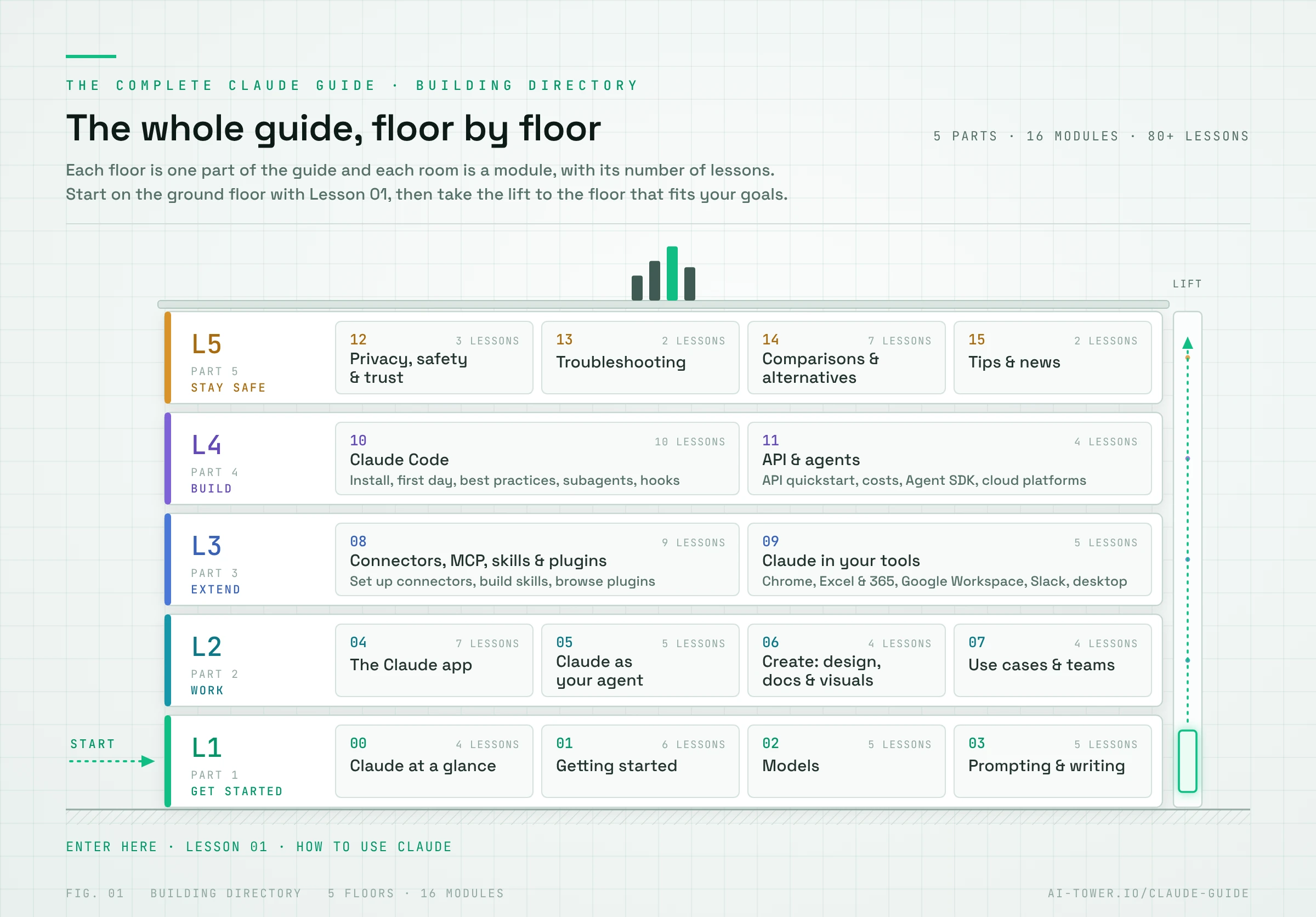
How this Claude guide works
-
Start on the ground floor.
Lesson 1, How to Use Claude, covers the basics in five levels, with prompts you can try right away.
-
Pick the floor you need.
Work through Part 1 in order, or jump straight to any module. Each one stands on its own.
-
Come back for new lessons.
A lesson without a link is still being written. New ones go live every Monday and Thursday.
Coming soon: learning paths. We’re putting together guided routes through the guide for different roles, from editors and designers to developers and team leads. Until then, the five parts below are the best way in.
Part 1: Get started
The ground floor. Everything you need to go from your first chat to using Claude with confidence: what Claude is, which plan and model to pick, and how to ask for what you want.
Module 0: Claude at a glance
Get the big picture before you dive in.
- Every Claude Product Explained. The app, Claude Code, Chrome, Slack, Design, Docs and more on one map.
- Which Claude Should I Use? A simple decision tree.
- Claude Glossary. Tokens, MCP, skills, artifacts and other jargon, in plain English.
- How Claude Works as an Agent. Loops and subagents, shown with animations.
Module 1: Getting started
Set up Claude, pick a plan and learn what it’s good at.
- How to Use Claude. A practical first guide with prompts you can try right away.
- Claude Plans & Pricing. Free vs Pro vs Max vs Team vs Enterprise.
- Claude Usage Limits Explained. And how to stop hitting them.
- What Claude Can and Can’t Do. Its strengths, its blind spots and where to double-check.
- Claude on iPhone & Android. Apps, widgets and shortcuts.
- Switching from ChatGPT to Claude. Bring your memory with you and adapt your prompts.
Module 2: Models
Claude comes in several models. Learn which one to use, and how to get more out of each.
- Claude Models Explained. Fable, Opus, Sonnet and Haiku, and when to use each.
- Claude Sonnet vs Opus. Which one fits your work.
- Effort, Extended Thinking & Fast Mode. Trade speed for depth and back again.
- Claude’s Context Window Explained. How much fits into one conversation.
- Every Claude Model Release. The complete timeline.
Module 3: Prompting & writing
Better instructions, better results: the prompting habits that matter most.
- Prompt Engineering for Claude. The rules that actually work.
- How to Prompt the Current Claude Models. What changes from model to model.
- How to Get Reliable Answers. Practical ways to reduce hallucinations.
- How to Make Claude Stop Sounding Like AI. Words to ban and what to say instead.
- Claude Prompt Library. Copy-paste prompts for everyday work.
Related on AI Tower: H-Neurons: Inside LLM Hallucinations and Origins
Part 2: Work with Claude
Use Claude for real work: the features you’ll use every day, longer tasks Claude can run on its own, and new formats like docs, slides and designs.
Module 4: The Claude app, feature by feature
The features you’ll use every day, from projects and memory to artifacts and voice.
- Claude Projects. How to organize your work.
- Memory, Chat Search & Incognito Chats. What Claude remembers, and what it doesn’t.
- Artifacts & Interactive Visuals. Calculators, quizzes and small tools you build just by describing them.
- Create and Edit Files. Excel, Word, PowerPoint and PDF.
- Web Search vs Research vs Extended Thinking. When to use which.
- Voice Mode. Talk to Claude instead of typing.
- How to Share Chats and Artifacts. Links, permissions and what other people can see.
Related on AI Tower: Best AI Tools for Research in 2026
Module 5: Claude as your agent (formerly Cowork)
In September 2026, Anthropic started merging Claude Cowork and chat into one Claude, beginning with the Pro and Max plans. Claude can now take on longer tasks, run work on a schedule and keep going after you close your laptop. This module shows you how.
- Claude Cowork Is Now Part of Claude. What changed and how to use it.
- Tasks You Can Hand Off to Claude. Real examples that save hours.
- Automate Your Work. Scheduled and recurring tasks.
- Let Claude Use Your Computer and Browser. When it helps and when to stay in control.
- Use Claude’s Agent Features Safely. A simple safety checklist.
Module 6: Create: design, docs and visuals
Turn ideas into designs, documents, slides and short videos.
- Claude Design. From your brand to finished slides in minutes.
- How to Create Infographics with Claude. Including how we make the visuals in this guide.
- Claude Docs, Slides, Dashboards & Smart Reports. The new formats, compared.
- Claude Motion Explained. From an idea to a short animated video.
Module 7: Use cases & teams
Claude for specific jobs, from content creation to the classroom, and how to bring it to your team.
- Claude for LinkedIn & Content Creation. From your old posts to your own writing skill.
- Claude for Your Job. A series for marketing, sales, legal, finance and small business.
- Claude for Students & Teachers. Study and teaching workflows.
- Roll Out Claude to Your Team in 7 Days. A day-by-day plan.
Related on AI Tower: Anthropic’s Higher Education Board & AI Fluency Courses
Part 3: Extend Claude
Connect Claude to the apps you already use and teach it new skills, so it works the way you do.
Module 8: Connectors, MCP, skills & plugins
Plug Claude into your apps and package your know-how so Claude can reuse it.
- Claude Connectors: The Complete Guide. Plug in the apps you already use.
- Best Claude Connectors in 2026. The ones worth setting up first.
- What Is an MCP Server? The open standard behind connectors, explained simply.
- Build Your Own Claude Connector. Remote and local MCP, step by step.
- Claude Skills Explained. What skills are and how to use them.
- How to Create Your Own Claude Skill. Write a SKILL.md and share it.
- Best Claude Skills in 2026. Ready-made skills to install today.
- Claude Plugins & the Marketplace. Skills, connectors and commands in one bundle.
- Skills vs Connectors vs Plugins vs Projects. Which one to use when.
Related on AI Tower: Do agent skills actually work? What SkillsBench found
Module 9: Claude in your tools
Use Claude inside Chrome, Excel, Google Workspace, Slack and your desktop.
- Claude in Chrome. Setup, use cases and safety.
- Claude for Excel & Microsoft 365. Formulas, analysis and reports.
- Claude for Google Workspace. Docs, Sheets, Slides and Gmail.
- Claude in Slack: Claude Tag Explained. A teammate that lives in your channels.
- Claude Desktop App. Tips, shortcuts and Quick Entry.
Part 4: Build with Claude
For makers and developers: build apps with Claude Code, then your own agents with the API. The first Claude Code lessons are written for beginners.
Module 10: Claude Code
Claude’s coding agent, from installation to automation.
- How to Install Claude Code. Mac, Windows and Linux.
- Claude Code for Beginners: Your First Day. How the agent loop works, with your first real project.
- Vibecoding with Claude Code. Build apps without being a developer.
- Claude Code Best Practices. Power-user tips and a cheat sheet.
- CLAUDE.md and Memory in Claude Code. Give Claude the context of your project.
- Subagents, Agent Teams & Parallel Work. Split big jobs across several agents.
- Automate Claude Code. Hooks, scheduled tasks and headless mode.
- Claude Code Everywhere. Terminal, desktop, web, mobile and your code editor.
- Code Review & Security Scans. Let Claude check code before you ship it.
- Claude Code Pricing & Usage Limits. What each plan includes.
Module 11: API & agents for developers
Call Claude from your own code and build agents that work on their own.
- Claude API Quickstart. API key, first call and pricing.
- Cut Your Claude API Costs. Prompt caching, batches and choosing the right model.
- Build Agents with Claude. Agent SDK vs Managed Agents.
- Claude on AWS, Google Cloud and Microsoft Foundry. Where else you can run Claude.
Related on AI Tower: Best Open Source AI Agents in 2026
Part 5: Stay safe and choose well
The top floor. Keep your data safe, fix common problems and see how Claude compares with the alternatives.
Module 12: Privacy, safety & trust
What happens to your data, and how to stay in control.
- Is Claude Safe? Privacy and your data, explained.
- Export, Delete and Control Your Claude Data. All the settings in one place.
- AI Agent Safety. Prompt injection, and how to use Chrome and agent tasks safely.
Related on AI Tower: Spies, Scammers and Fake Newsrooms: What Anthropic Found People Doing With Claude
Module 13: Troubleshooting
Quick fixes when something doesn’t work.
- Claude Not Working? Common errors and how to fix them.
- Claude FAQ. Short answers to the questions people ask most.
Module 14: Comparisons & alternatives
How Claude compares with other assistants and coding tools.
- Claude vs ChatGPT. The two most popular assistants, side by side.
- Claude vs Gemini. How Anthropic and Google compare for everyday work.
- Cursor vs Claude Code. An AI code editor against a coding agent.
- Codex vs Claude Code. OpenAI’s coding agent against Anthropic’s.
- Claude Sonnet vs Opus. See Module 2.
- Best Claude Alternatives. When another assistant fits better.
- Best Claude Code Alternatives. Other coding agents worth a look.
- Best Tools That Work with Claude. Tools from the AI Tower catalog with a Claude connector.
Module 15: Tips & news
Small tricks and monthly updates to keep you current.
- Claude Tips Nobody Tells You. Plus a free PDF cheat sheet.
- Claude News: What’s New This Month. Updated on the first Wednesday of every month.
How long does it take to learn Claude?
Less time than you might think. If you spend 15 to 30 minutes a day, one or two lessons at a time, here’s a rough pace:
| Where you are | Time | What you can do afterwards |
|---|---|---|
| Lesson 1 | About 30 minutes | Write a better email, research a question with sources and build your first small app |
| Part 1: Get started | Two to three weeks | Pick the right plan and model, and write prompts that get usable answers the first time |
| Parts 2 and 3: Work and extend | Three to four weeks | Organize your work in projects, hand off longer tasks and connect Claude to your apps |
| Part 4: Build | At your own pace | Build apps with Claude Code and your own agents with the API |
You don’t need to finish the whole Claude guide. Most people get what they need from Parts 1 and 2 and dip into the rest when a task calls for it. Part 5 is there whenever you have a question about privacy, an error or an alternative.
How we keep this Claude guide up to date
Claude changes fast. New models, features and plans arrive every few weeks. Once a month we go through Anthropic’s three changelogs: the platform release notes, the Help Center release notes and Claude Code’s “What’s new”. Then we update every lesson that’s affected. Each lesson shows when it was last checked and which model we tested it with.
FAQ
Is this Claude guide free?
Yes. Every lesson is free to read, with no paywall and no sign-up. Think of it as a free Claude course you can take at your own pace.
Do I get a certificate?
No. This guide has no sign-up, tests or certificates. If you’d like a certificate, Anthropic’s free Claude Academy courses, such as Claude 101, give you one when you finish, and you can add it to your LinkedIn profile. The two work well together: the Academy for the official basics, this guide for hands-on practice with real prompts.
Is Claude difficult to learn?
No. You talk to Claude in plain language, so the basics take minutes. What takes practice is briefing it well and knowing which feature fits the job. That’s what this guide teaches, one short lesson at a time.
Do I need a paid Claude plan to follow along?
No, most lessons work on the free plan. A few features need a paid plan, including Research and Claude Code. The lessons on those features point this out at the top.
How is this different from Anthropic’s own documentation?
Anthropic’s docs explain each feature on its own. This guide shows you how to combine them for real work, with tested prompts, examples and visuals. Every lesson links to the official pages so you can go deeper.
Where should I start?
Start with How to Use Claude, then work through Part 1. If you already use Claude every day, jump straight to the part you need.
Official resources
- Claude Help Center: Anthropic’s guides for every Claude feature and plan
- Claude Platform docs: models, prompting, the API and agents
- Claude Code docs: installation, workflows and what’s new
- Claude Academy: Anthropic’s free courses, such as Claude 101 and Claude Code 101, with completion certificates
- Claude pricing: current plans and prices
- Claude Cowork and chat are now one Claude: Anthropic’s announcement from 16 September 2026
