Ten AI tools for students sorted by study job, from Gemini Notebook and ChatGPT's study mode to Knowt flashcards, Consensus paper search and Gamma slides, with free tiers and student prices checked.
The best AI tools for students depend on the job in front of you. For learning from your own readings and slides we recommend Gemini Notebook, and ChatGPT’s study mode is the free tutor for everything else. Turbo AI turns lecture recordings into study sets, while Knowt suits flashcard routines and AP, SAT or ACT prep. Perplexity and Consensus handle research with sources you can open. For writing, Grammarly gives feedback on a finished essay, QuillBot helps on a tight budget and Paperpal is built for theses. Gamma covers class presentations. Rules on AI differ from course to course, so read your syllabus before relying on any of them.
Tools, features and prices checked on November 4, 2026.
What changed for student AI tools in 2026
Student AI tools now fall into a few groups. Chat assistants have added tutor modes that ask questions before they explain, as ChatGPT and Perplexity both do, while notebook tools answer from the files you give them and study apps turn lectures and PDFs into flashcards and quizzes. Academic search tools work from published papers.
Google made the most visible move: on July 16 NotebookLM became Gemini Notebook, and a run of study features followed through the autumn. Outcome data has appeared as well. In a randomized study OpenAI ran with over 300 college students, those given study mode scored about 15% higher than a no-AI control group in microeconomics, while neuroscience results were not distinguishable from traditional online resources. OpenAI says the analysis continues, and a Durham University commentary questions the new measurement suite it built for the work. Campus rules set the limit on all of this: Stanford’s guide for students tells them to assume AI is not allowed unless the syllabus or assignment says otherwise.
How we picked these tools
AI is either the whole product here or a substantial feature of its own that matters for studying, and each tool had to be the strongest answer for a different study job. Tools with no AI of their own, general workspaces where AI is a side feature and apps built around exam solvers are out. We checked features and prices on each vendor’s site and help pages, and we did not run our own test of learning outcomes.
- Learning support: hints, questions and quizzes that make you work through the material yourself.
- Checkable sources: answers tied to your own files, or to pages and papers you can open.
- Course material: how well it takes what a course produces, such as PDFs, slides, recordings and videos.
- Revision output: notes, flashcards and quizzes you can study from without rebuilding them elsewhere.
- Course-rule fit: whether it can be limited to feedback and self-testing when a course restricts generated text.
- Student cost: how far the free tier goes, and whether a student price exists.
1. Gemini Notebook
Give Gemini Notebook your syllabus, slides and readings, and its answers stay grounded in those files. The tool was called NotebookLM until July. We rank it first because studying from your actual course material beats studying from a generic explanation.
Since October 29 you can also add hundreds of free textbooks from OpenStax, Open Textbook Library and S Chand Publishing, with inline citations that link back to the original.
Key AI features
- Study outputs: flashcards, quizzes, reports, Audio Overviews and Video Overviews built from your sources.
- Interactive learning overviews: reports that weave summaries together with quizzes, flashcards and mind maps, open to all users since September.
- Lecture recorder: the Android and iOS apps capture audio and keep your notes next to your sources.
- New quiz formats: short answer, multiple select and fill in the blank.
Pros
- You can check a claim against its source before revising from it, because textbook answers and quiz explanations carry citations.
- You skip writing flashcards and practice questions by hand.
- US college students on the free year get four times the Gemini Notebook limits of people without an AI subscription.
Cons
- Recordings stop at one hour, and voice conversations reached Google AI Ultra subscribers first.
- The free year needs a payment method and renews at $19.99 per month unless you cancel.
Pricing: Free to start. US college students can claim a year of Google AI Pro by December 31, 2026, then $19.99 per month. In over 140 markets outside the US the same deadline applies to a year of Google AI Plus, then $4.99 per month or the local equivalent.
View Gemini Notebook on AI Tower
2. ChatGPT

Stuck on a problem set at midnight, you can ask ChatGPT to coach you through it on any plan, including Free. Study mode can ask what you already know, where you got stuck and what step you would try next. To start it, type @study on the web, pick Study from the + menu in the apps, or open chatgpt.com/studymode.
Key AI features
- Understanding checks: it quizzes you one question at a time, waits for your answer and says what to review next.
- Your course files: notes, slides, a syllabus or a photo of a math problem can all be uploaded for it to reference.
Pros
- You stay the one doing the thinking, and that is the skill an exam will test.
- Starting costs nothing beyond signing in.
- Any subject works without preparing a notebook of course files first.
Cons
- OpenAI’s help page warns that it can make mistakes and may sometimes give a direct answer.
- The Study option is missing from Temporary Chats, GPTs and Projects, so it cannot live inside a project for your course.
Pricing: Included on every ChatGPT plan, under that plan’s usual message limits.
3. Turbo AI

Over 10 million learners use Turbo AI, by the vendor’s count, and the app began life as TurboLearn. Its site claims a 4.8 rating from more than 300,000 reviews; the US App Store page shows 4.7 from 34,000. You record or upload a lecture, get notes back, and fix them in an editor that works like Google Docs. If your notes come from meetings instead, our list of the best AI note takers is the better place to look.
Key AI features
- AI Notetaker: listens to a lecture and writes the notes, ready for review with the activities you choose.
- Study material generator: PDFs, Word files, YouTube videos and recordings become flashcards, quizzes and podcasts.
- Practice questions: open-ended, fill-in-the-blank and multiple-choice.
Pros
- Exam prep takes fewer steps, because the notes and the quizzes come from one app.
- Engineering and science students keep formulas, equations and code intact.
Cons
- The website shows no prices, so you have to look in an app store to compare.
Pricing: Free tier with note generation, flashcards and quizzes. The US App Store lists Turbolearn Unlimited at $14.99 or $19.99 per month.
4. Knowt
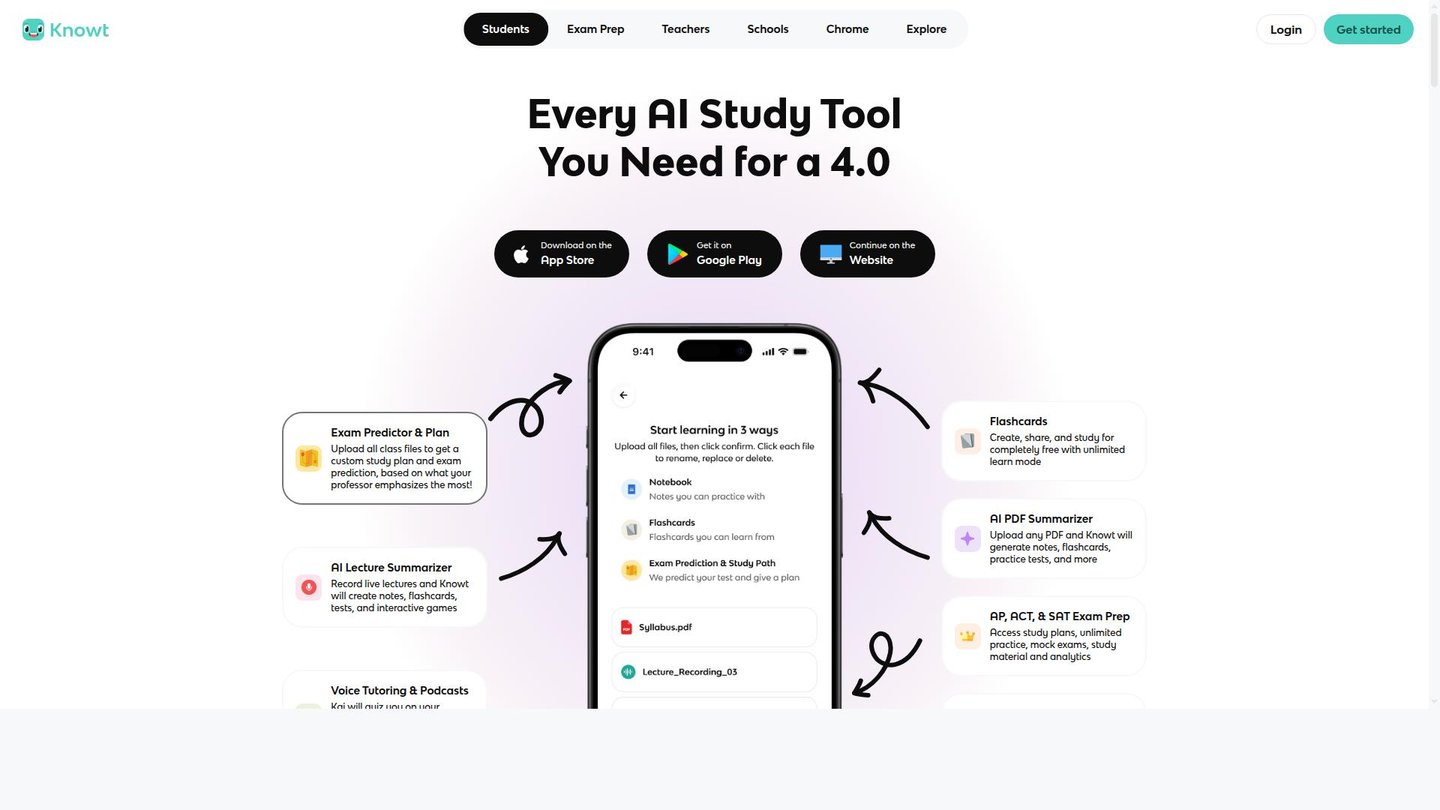
Flashcards are where Knowt starts, and spaced repetition and its study modes sit outside the paywall. Its plan page lists the AI summarizers, voice tutor and podcast generator under the paid Ultra plan and names no AI tool under free Basic.
Key AI features
- Exam Predictor: upload class files and get a study plan plus exam predictions, weighted, Knowt says, toward what your professor emphasizes.
- Kai: answers questions about your notes, videos and slides, explains why a practice answer was wrong and can quiz you by voice.
- AI summarizers: handle PDFs, videos, images, PowerPoint files and lecture recordings.
Pros
- A daily revision routine can stay free.
- Moving over from Quizlet does not mean rebuilding your sets, thanks to a Chrome extension that imports them.
- High school students get AP, SAT and ACT practice in the same app as their class notes.
Cons
- Monthly billing costs about three times the annual rate.
Pricing: Basic is free. Ultra costs $7.99 per month billed annually ($95.99) or $24.99 billed monthly.
5. Perplexity

A question with a deadline attached suits Perplexity: answers arrive with numbered citations you can preview or open, and trust labels such as Academic and Government help you judge them. Learn Mode adds a study layer, though its availability is confusing. Perplexity’s help article says the mode is open to all users, then says that for now the toggle is only available to verified students.
Key AI features
- Learn Mode: breaks a topic into steps, gives hints, gauges what you already know and follows up with mini-quizzes.
- Study materials: flashcards, multiple-choice quizzes and free-response exercises, including from uploaded readings or lecture notes.
- Screenshot walkthroughs: attach a picture of a problem and it works through the solution step by step.
Pros
- Opening a source before you rely on it protects you from the invented citations Stanford’s guide warns about.
- A verified student pays a discounted price for the full Pro feature set, including unlimited Pro Searches.
Cons
- Sources include ordinary articles and websites, so coursework that demands peer-reviewed work still needs a paper search.
Pricing: Free plan; Education Pro costs $10 per month with SheerID verification.
6. Consensus

Published research is the starting point in Consensus, which searches more than 400 million scientific papers. It fits the start of a paper, when you need to know whether a claim holds up before you build an argument on it.
Key AI features
- Consensus Meter: shows how far the research agrees on a yes/no question.
- Study Snapshots: short summaries of a paper’s key findings and methods.
- Ask Paper: chat with any paper.
Pros
- You begin with studies that exist, so less time goes into chasing sources.
- Reference formatting takes less work, because results export as RIS, BibTeX or CSV.
- Paper search stays unlimited on the free plan, which can carry you through a whole semester.
Cons
- The free plan stops at 10 Pro messages, 3 Deep reviews and 10 Study Snapshots a month.
- Its index is scientific papers, so a literature or history essay gets less from it.
Pricing: Free plan; Pro costs $20 per month or $144 per year. Students and faculty get 40% off after verifying an academic email.
7. Grammarly
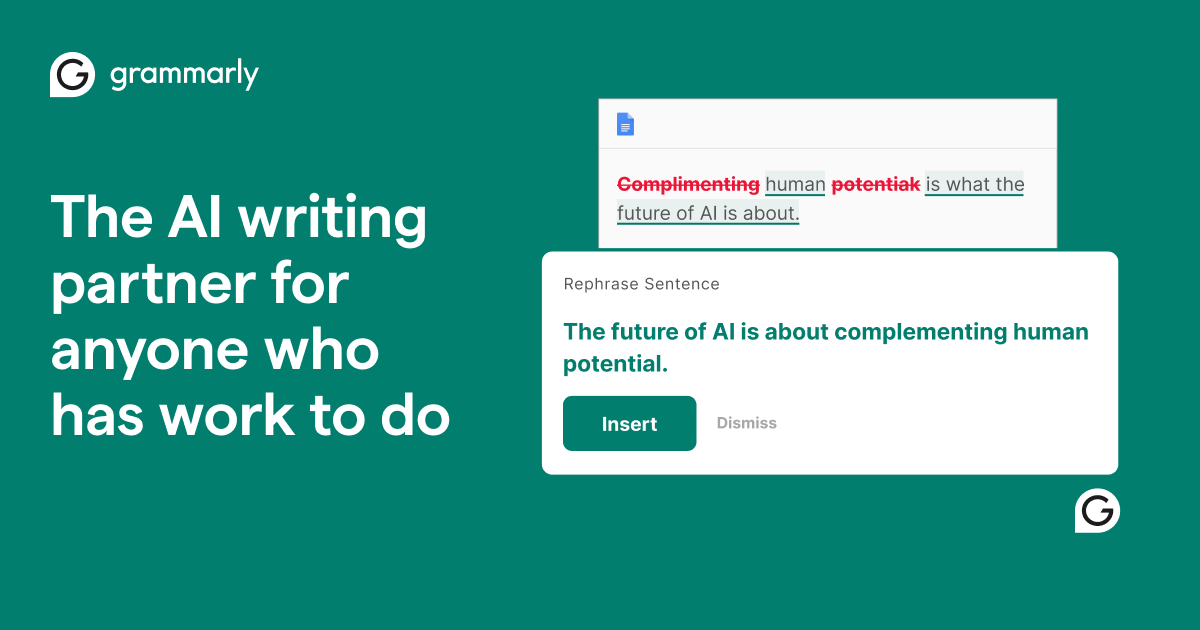
Add your rubric and assignment details to the AI Grader in Grammarly, and it returns an estimated score plus suggestions, with the prediction changing as you apply them. Grammarly itself says the estimate should not be treated as your actual grade.
Check the course rules first. Under a Notre Dame policy in force since August 2024, an instructor’s ban on generative AI also covers editing tools like Grammarly unless stated otherwise.
Key AI features
- Citation Finder: flags passages that may need a source, recommends sources and formats the citation in APA, MLA or Chicago.
- Plagiarism Checker: scans for similarities and offers citation suggestions.
- AI Detector: looks for AI-generated content and shows where to edit.
Pros
- Weak spots show up while there is still time to fix them.
- Feedback and citations live in one editor, which means fewer tools open the night before a deadline.
- Most agents can be tried for free on a real essay before you pay.
Cons
- Free use stops at one grade prediction with three pieces of feedback, and five inserted citations, per day.
- Plagiarism and AI-text detection are listed under Pro.
Pricing: Free plan with 100 AI prompts a month; Pro costs $12 per month billed annually or $30 billed monthly.
8. QuillBot

Long readings and clumsy first drafts are where QuillBot helps most. Keep it to your own drafts and assigned readings, since rewording a source does not make the text yours.
Key AI features
- Paraphraser: rewrites your text, with Standard and Fluency modes on the free plan.
- Summarizer: condenses up to 1,200 words without paying.
- Citation Generator and AI Detector: sit in the same account next to the Grammar Checker.
Pros
- You can try it on real coursework before spending anything.
- Seminar prep goes faster when a long reading has been condensed first.
- A full year of Premium costs less than $100.
Cons
- Free paraphrasing stops at 125 words, which is short for a full essay paragraph.
Pricing: Free plan; Premium costs $19.95 monthly, $13.31 per month billed quarterly, or $8.33 per month billed annually ($99.95).
9. Paperpal

A thesis chapter needs correct references, consistent language and a similarity check before it reaches a supervisor, and Paperpal puts those into one product. An add-in for Word and browser extensions for Google Docs and Overleaf keep the checking inside the file you are already writing.
Key AI features
- Academic language suggestions: grammar and tone edits aimed at academic writing.
- Plagiarism Check: compares your text against more than 99 billion sources.
- Citations and Reference Check: APA, MLA and 10,000 other styles.
- Research tools: access to more than 250 million articles, plus chat with your PDFs.
Pros
- You should have fewer edits to undo than with a general writing tool, because the suggestions target academic prose.
- One subscription can replace separate plagiarism and citation tools during a long project.
Cons
- Prime caps plagiarism and reference checks at 10,000 words a month, which a full thesis can exceed.
Pricing: Free plan with 200 grammar edits a month; Prime costs $12 per month ($144 billed annually) and Pro $29 per month ($348 billed annually).
10. Gamma

A group presentation due tomorrow is the obvious case for Gamma. Gamma 5, released on October 6 for every plan, added an agent that questions you about your idea before it designs anything, which helps when your outline is thin.
Key AI features
- Agent-led editing: keeps context through each change, so you refine without explaining your goal again.
- Freeform canvas: take over and move individual elements yourself whenever you want.
- Design-preserving import: PowerPoint files and PDFs come in with their design intact and stay editable.
Pros
- Layout takes less of your time, leaving more for the argument you will present.
- Last semester’s slides can be reworked instead of rebuilt.
Cons
- The 400 free credits do not refresh, each prompt stops at 10 slides, and PDF and PPTX exports carry a Gamma badge.
Pricing: Free plan; Plus costs $9 per month ($108 billed annually) with 1,500 monthly credits and no Gamma branding. The pricing page lists no student plan.
AI tools for students compared
| Tool | Best for | Standout AI feature | Price from |
|---|---|---|---|
| Gemini Notebook | Your own course material | Answers grounded in your sources | Free |
| ChatGPT | Tutoring in any subject | Study mode | Free |
| Turbo AI | Lecture study sets | AI Notetaker | Free; $14.99/month |
| Knowt | Flashcards and test prep | Exam Predictor | Free; Ultra $95.99/year |
| Perplexity | Quick cited research | Learn Mode | Free; Education Pro $10/month |
| Consensus | Peer-reviewed sources | Consensus Meter | Free; Pro $144/year |
| Grammarly | Essay feedback | AI Grader | Free; Pro $144/year |
| QuillBot | Rewording on a budget | Paraphraser | Free; Premium $99.95/year |
| Paperpal | Theses and papers | Plagiarism Check against 99B+ sources | Free; Prime $144/year |
| Gamma | Class presentations | Agent that asks before designing | Free; Plus $108/year |
What didn’t make the list
Claude has a Learning mode that asks guiding questions, but it overlaps with ChatGPT’s study mode, and Anthropic’s education material centers on university-wide plans. Google Gemini shares its student plan and notebooks with our first pick. Otter AI offers live lecture captions, though we see it as a meeting tool first. Flashcard users will find Quizlet close to Knowt, and StudyFetch covers the same ground as Turbo AI. Anki schedules flashcards well, but it has no AI card generation of its own.Notion is a general workspace where AI plays a supporting role. StudyX leans toward homework answers and exam solvers.
FAQ
What is the best free AI tool for students?
ChatGPT’s study mode is the best free starting point, because it covers any subject and comes with the Free plan. Add Gemini Notebook when you have readings and slides, and Consensus when a paper needs published studies. Knowt’s free plan handles flashcards.
Which AI tools are best for college students?
Gemini Notebook and Consensus are the two we would set up first, one for course material and one for finding studies. Both have student deals, and Google’s ends on December 31, 2026. Paperpal starts to pay off once a thesis comes along.
Is using AI tools for schoolwork cheating?
It depends on your course and on how you use the tool. Stanford’s guide treats generative AI like help from another person, prohibits using it to substantially complete an assignment, and lists self-quizzing and writing feedback among possible uses. Check your own syllabus, disclose what you used and ask when unsure.
Is ChatGPT free for students?
Yes, ChatGPT has a Free plan, and study mode is included on it, on the web and in the iOS and Android apps. The usual message limits still apply, since study mode adds no extra messages. Some universities run ChatGPT Edu workspaces, where an admin may require study mode for regular conversations.
Do AI study tools actually help students learn?
Sometimes, and the evidence is thin. OpenAI’s own study showed a gain in microeconomics and a mixed result in neuroscience, and we found no independent study comparing the tools on this list. Stanford’s guide says active strategies such as self-quizzing work better than passive ones, so use these tools to test yourself.
Verdict
Start with Gemini Notebook if your course gives you readings and slides, and keep ChatGPT’s study mode for everything else. Turbo AI suits students who want lectures turned into study sets, and Knowt suits flashcard habits and test prep. Use Perplexity for quick research and Consensus when a paper needs studies. Send finished essays through Grammarly, watch the budget with QuillBot, and move to Paperpal for a thesis. Gamma handles the slides.