Ten AI tools for product managers, followed through one feature from the first customer signal to launch: Productboard Spark, Granola, Dovetail, Amplitude, Claude, ChatPRD, Figma, Lovable, Linear and Notion, with prices checked.
The best AI tools for product managers each take over one stage of the job. Claude drafts a PRD from your research, and ChatPRD reviews it before engineering does. Granola takes notes on customer calls without a bot in the room, while Dovetail and Productboard Spark turn piles of feedback into patterns you can cite. Amplitude answers questions about usage data, Figma and Lovable turn a spec into something people can click, and Linear and Notion take over tickets and status work. To show where each one fits, this list follows Ben, an invented product manager at a B2B software company, through two weeks and one feature request. Ben is made up. The tools and every feature we name are real.
Tools, features and prices checked on November 11, 2026.
What changed for AI product management tools in 2026
AI in product management software now sits inside the tools where the work already happens. Feedback platforms point to the customer requests behind each pattern, spec tools draft and score PRDs, design tools build prototypes from a PRD, issue trackers write their own tickets and analytics platforms answer questions asked in plain English.
Much of that arrived as agents during 2026. Amplitude introduced its AI Agents in February, and Linear Agent went into public beta in March. Notion’s Custom Agents moved to paid credits in May, Dovetail’s agents became generally available in July, Anthropic started merging Cowork into the main Claude app in September and the Figma agent left beta in October. The bill changed with the features. Agent work increasingly runs on credits on top of the seat, at $10 per 1,000 Notion credits or $0.15 per Dovetail credit, while a Figma Professional seat includes 3,000 AI credits a month.
How we picked these tools
Each tool had to do part of a product manager’s work itself, from reading feedback to writing tickets, and each covers a different stage of shipping a feature. General chatbots without a product workflow and tools whose AI only rewrites text are out. Every pick shipped updates in the last three months. We checked features and prices on the vendors’ own sites and release notes.
- Grounded in evidence: drafts and answers point back to the feedback, calls or data they came from.
- One stage, done well: it finishes a PM job end to end.
- Fits your stack: it reads from or writes to tools like Jira, Linear, Slack and Google Docs.
- Hand-off quality: engineers can build from the spec and designers can edit the prototype.
- Predictable cost: a clear seat price, and agent credits you can see and cap.
1. Productboard Spark: Find the spark in your feedback
Ben’s two weeks start on a Monday with a list he did not write. Productboard Spark, the AI agent inside Productboard, refreshes its product opportunities every week, and this week larger accounts keep asking for approvals with more than one step. Every point links to the requests behind it. Ben reads the customers’ own wording before he commits two weeks to the topic.
Productboard launched Spark publicly in January 2026 and in June presented it as an agentic product system that carries an idea from feedback to spec and release notes. There is no standalone version, so it suits teams whose feedback already lands in Productboard.
Key AI features
- Opportunity discovery: patterns in customer feedback, refreshed weekly.
- Specs and release notes: drafted from the same evidence.
- Suggested Insights: AI suggestions on incoming feedback, announced in August 2026.
Pros
- The weekly feedback triage shrinks to a short list.
- Priority calls are easier to defend when each point leads to real customers.
- Discovery and delivery documents share one system, so less gets copied between tools.
Cons
- Business and Enterprise plans only, with no published price.
- It sees only the feedback that reaches Productboard.
Pricing: Business and Enterprise plans only, price on request.
2. Granola: Customer calls without a bot in the room
From Tuesday to Thursday Ben talks to five of the accounts behind that list. Granola transcribes from his laptop’s own audio, so no recording bot joins the call, and a Brief is ready when he dials in. Afterwards the notes arrive with action items and follow-ups. On Thursday evening he asks one question across all five calls. Every admin’s view on approvals comes back in a single answer, with no transcript to reread.
Team Spaces arrived in March 2026, and Granola has supported 32 languages since September.
Key AI features
- Chat across meetings: answers drawn from all of your past calls.
- Recipes: reusable prompts a team can share.
- MCP connector: meeting context for other AI tools.
Pros
- Interviewees see only you on the call.
- You can listen during an interview instead of typing.
- One question replaces rereading five sets of notes.
Cons
- The free Basic plan keeps only 30 days of history.
Pricing: Basic is free; Business costs $14 and Enterprise $35 per user per month.
3. Dovetail: Make the research fit together
Five transcripts are manageable. Add a quarter’s worth of support tickets and they are not, and that is the pile Ben hands to Dovetail on Friday morning. Channels sorts it into themes and Chat answers his questions with a citation for every claim. Before booking another round of interviews, he questions a Digital Twin of the enterprise-admin segment, an AI persona built from his own customers’ feedback.

The agents, generally available since July 2026, draft product requirements straight into Jira or Linear. At $4,800 a year for the entry plan, Dovetail is a team purchase.
Key AI features
- Digital Twins: a customer segment you can chat with, every answer traced to a source.
- Docs: a Chat answer turned into a PRD, co-authored with Claude or ChatGPT since November 6.
- MCP connectors: research context for other AI tools.
Pros
- Hand-sorting interviews gives way to reviewing themes.
- Sourced findings hold up better in a stakeholder meeting.
- Hypotheses get tested before new interviews are booked.
- Insights reach the backlog instead of a research deck.
Cons
- There is no free plan, only a trial.
- The pricing page lists Digital Twins as not included on Bronze.
Pricing: Bronze costs $4,800 per year, with credits at $0.15 each; Silver and Gold are priced on request.
4. Amplitude: Measure how big the problem is

Interviews tell Ben why admins struggle with approvals. How many of them struggle is a question for the data, so on Friday afternoon he asks Amplitude in plain English. Its AI Agents, introduced in February 2026, look for the root cause, build a dashboard and recommend actions. He links the chart in the spec. Once the feature ships, the same agents flag problems without being asked.
An MCP server opens Amplitude data to other AI assistants, and Claude lists Amplitude among its Cowork connectors.
Key AI features
- Plain-language questions: you ask, and the agents investigate and chart the answer.
- AI Feedback: customer feedback turned into product ideas.
Pros
- A funnel question gets answered without SQL or a ticket to the data team.
- Problems you did not think to check still get flagged.
- Small teams can start for free with the agents included.
Cons
- The Plus plan is usage-based, so the bill grows with your event volume.
Pricing: Free plan with 2M events a month, AI Agents and MCP included; Plus is usage-based from $0; Growth and Enterprise on request.
5. Claude: Write the first draft of the spec

Monday of week two is spec day. Ben drops his research, the team’s PRD template and an older PRD he likes into one folder and points Claude at it. With Anthropic’s Product Management plugin installed, Claude first asks him about goals and non-goals. Then /write-spec drafts the PRD with user stories, prioritized requirements and success metrics, pulling context from his Linear backlog and Notion pages as it writes.

This runs in Cowork, Claude’s agent mode for files and connected tools, which Anthropic has been folding into the regular app since September.
Key AI features
- More PM commands: /roadmap-update, /stakeholder-update, /synthesize-research, /competitive-brief and /metrics-review.
- Connectors: Linear, Notion, Google Drive and Amplitude, among others.
Pros
- The first draft follows your own template instead of a generic outline.
- Specs from different PMs share one structure when the team uses the same plugin.
- You switch tabs less, because research, backlog and docs feed one draft.
Cons
- Agent tasks use up plan limits faster than chat does.
- The merged app reaches Pro, Max and Ultra first, with Team and Free later.
Pricing: Pro costs $17 per month billed annually or $20 monthly, Max starts at $100 and Team at $20 per seat per month billed annually. Every paid plan includes Cowork.
6. ChatPRD: Stress-test the PRD
A draft that reads well can still miss the questions an engineer asks in the first five minutes of a review. On Tuesday Ben moves the PRD into Google Docs and runs ChatPRD on it. The tool drafts and improves PRDs and reviews product strategy. Since an October 9 release that review happens inside Google Docs and SharePoint, and Ben closes the gaps before the engineers open the doc.
Key AI features
- Scorecards: a grade for every document.
- Knowledge map: an overview of your product and its features.
Pros
- Gaps show up before the engineering review.
- Feedback lands in the doc the team already uses.
- At $15 a month, one PM can pay for it without a budget request.
Cons
- The free plan stops at three chats.
Pricing: Free with 3 chats; Pro costs $15 per month or $179 per year; Teams costs $29 per seat per month.
7. Figma: Sketch the flow with your designer
Wednesday belongs to Ben’s designer as much as to Ben. In the team’s Figma file, the Figma agent reads the PRD and builds an editable prototype on the canvas. The spec moves in too. Specs, in open beta since October 15, puts documents on the canvas, where the agent can create and update the PRD next to the screens and a connector such as Hex can answer an open question with an analysis.
The agent left beta on October 6. Its requests use AI credits, while writing in a Spec by hand does not.
Key AI features
- Figma Make: a prototype from a prompt, for quick experiments.
- Specs in FigJam: the same documents on FigJam boards.
Pros
- PM and designer review the spec and the screens in one file.
- The designer starts from a prototype instead of a blank frame.
- The result stays in Figma, where the designer can keep refining it.
Cons
- Specs is still in open beta.
- AI credits reset monthly and do not roll over.
Pricing: A Professional Full seat costs $16 per month and includes 3,000 AI credits a month; the Specs beta is open on all seats.
8. Lovable: Put a working app in front of customers

A Figma prototype shows the flow. Ben’s customers need to submit a request and watch it wait for a second approver, so on Thursday he describes the flow to Lovable. It generates a working web app with frontend, backend, database and login, and Plan mode helps him settle the scope before any code exists. That afternoon three customers click through it on calls, with Granola taking notes again.

Key AI features
- Build and Chat modes: changes applied from the chat, or discussed without touching the code.
- Readable code: anyone with edit access can read it, and paid plans can edit it.
Pros
- Customers react to a flow that works, which brings out problems a clickable mockup can hide.
- No engineering sprint goes into an idea before users have tried it.
Cons
- The free plan gives 5 build credits a day and no more than 30 a month.
Pricing: Free plan; Pro costs $25 per month for 100 credits, or $250 per year.
9. Linear: Turn the spec into tickets
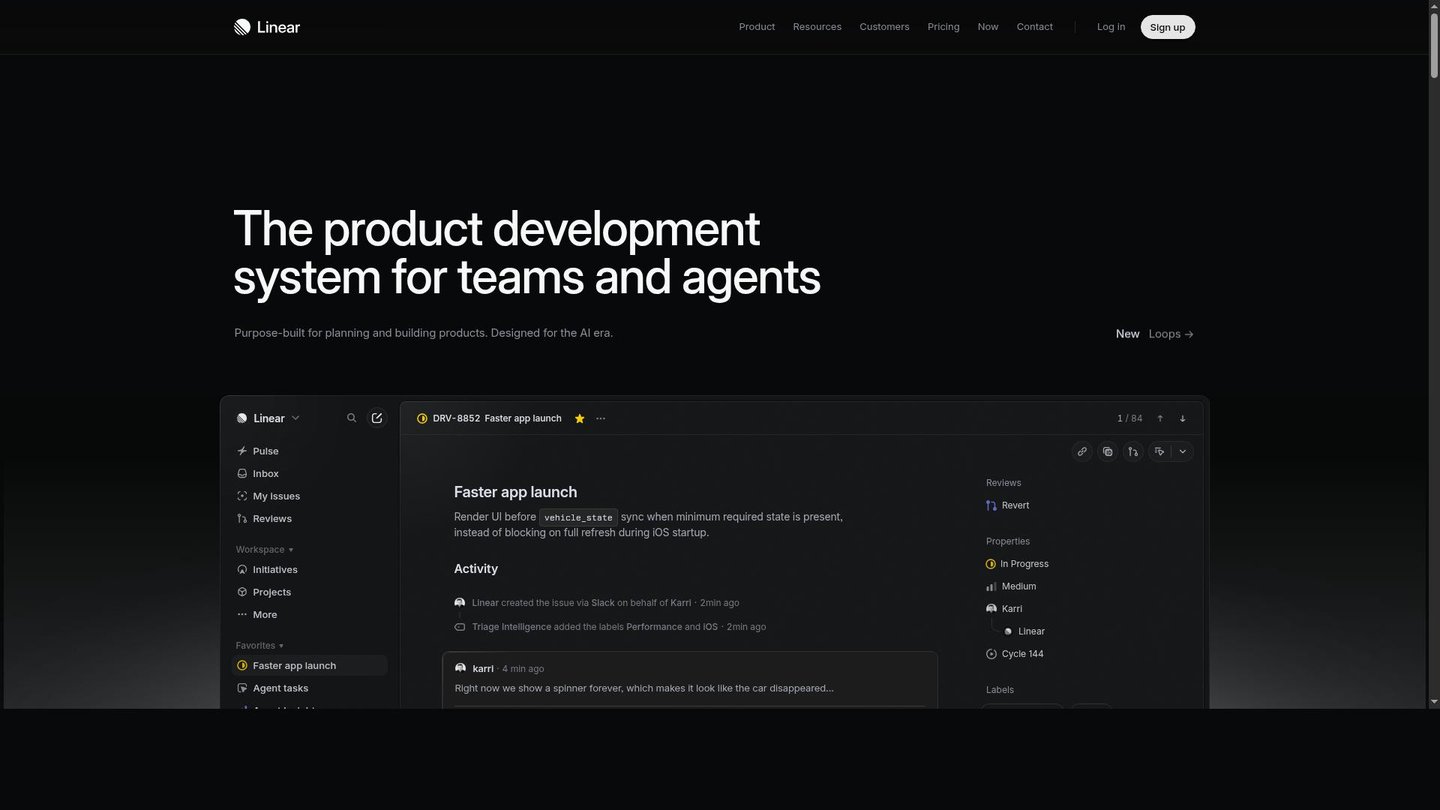
Friday is when the spec turns into work. In Linear, Ben asks Linear Agent to turn the spec discussion into issues. It also suggests what the next cycle should hold, based on repeated themes in the backlog, and writes the first version of his weekly project update. All of that comes with the free plan.
Key AI features
- Triage Intelligence: suggested assignees and labels for incoming issues.
- Loops: recurring workflows run by the agent.
Pros
- Less time goes into rewriting a spec as tickets.
- The weekly update starts as a draft.
- Incoming requests reach the right person sooner.
Cons
- Triage Intelligence needs the Business plan.
- Loops and the cloud coding agent run on AI credits.
Pricing: Free plan with 250 issues and Linear Agent; Basic costs $10 and Business $16 per user per month, billed yearly.
10. Notion: Docs that update themselves

One tool worked through both weeks without Ben opening it much. In Notion, a Custom Agent runs each time an AI Meeting Note in the team workspace is finished. It updates the project tracker, posts decisions and next steps to Slack and turns feedback from the meeting into tickets. Notion added that trigger on July 31, and Morning Brew uses a similar agent to keep its PRDs current from meeting transcripts, Linear and Slack.
Key AI features
- Schedules and triggers: agents that run on a timetable or when a database changes, shared across the workspace.
- Linear PRD Implementer: a template that turns a Notion PRD into a Linear project with milestones and issues.
Pros
- Recaps and status posts stop being a PM chore.
- PRDs and decision logs stay current without anyone remembering to update them.
- Once shared, one agent serves the whole team.
Cons
- Custom Agents need a Business or Enterprise plan.
- Heavy use costs credits on top of the seat.
Pricing: Business costs $20 per member per month and includes 500 Select credits per seat each month for Custom Agents; extra credits cost $10 per 1,000.
AI tools for product managers compared
| Tool | Best for | Standout AI feature | Price from |
|---|---|---|---|
| Productboard Spark | Teams whose feedback lives in Productboard | Weekly opportunities with cited feedback | Business plan, price on request |
| Granola | Customer interviews and calls | Bot-free notes and chat across meetings | Free; Business $14/user/month |
| Dovetail | Research-heavy product teams | Digital Twins of customer segments | $4,800/year |
| Amplitude | Data questions without an analyst | AI Agents for root-cause analysis | Free |
| Claude | Drafting specs and updates | /write-spec in the PM plugin | $17/month billed annually |
| ChatPRD | Reviewing PRDs before engineering | Reviews inside Google Docs | Free; Pro $15/month |
| Figma | PM and designer on one canvas | Agent builds prototypes from a PRD | $16/month (Full seat) |
| Lovable | Testing ideas as working apps | Full-stack app from a description | Free; Pro $25/month |
| Linear | Teams that ship in Linear | Linear Agent writes issues and plans cycles | Free; Basic $10/user/month |
| Notion | Teams that document in Notion | Custom Agents after meeting notes | Business $20/member/month |
What didn’t make the list
Jira Product Discovery came close for teams on Atlassian. Its Rovo AI drafts idea descriptions and condenses rough notes, but it needs the Premium plan and an admin to switch it on, and it covers less ground than Productboard Spark. ChatGPT is a capable drafting partner, but Claude got the spot because Anthropic ships a plugin built for product work. Magic Patterns turns a requirement into high-fidelity UI and deserves a look, though Figma and Lovable already cover prototyping in Ben’s week.
FAQ
What is the best AI tool for product managers?
It depends on where you lose the most time. No single tool covers the whole job, and for specs we would start with Claude and its Product Management plugin. Dovetail goes deepest on customer research, and Productboard Spark fits teams already on Productboard.
Can AI write a PRD?
Yes, as a first draft. Claude’s /write-spec command produces a PRD with user stories, prioritized requirements and success metrics from your research and template, and Dovetail can turn a research answer into one. The decisions inside still belong to the PM, so review the draft before engineering sees it.
Which AI tools for product managers are free?
Several have free plans that cover real work. Granola’s Basic plan keeps 30 days of notes, Amplitude includes its AI Agents for up to 2M events a month and Linear’s free plan comes with Linear Agent. ChatPRD offers three free chats, and Lovable gives 5 build credits a day.
How do product managers use AI to analyze customer feedback?
To find patterns without losing the evidence. Productboard Spark scans incoming feedback every week and links each opportunity to the original requests. Dovetail groups interviews and tickets into themes, cites its answers and lets you question a Digital Twin of a customer segment.
Will AI replace product managers?
Unlikely with tools like these. Each one takes over a task, such as notes, a first draft, tickets or a dashboard, and the decisions stay with the PM. Ben still had to pick the feature, talk to customers and sign off on the spec.
Verdict
Ben’s feature went from a weekly opportunity list to a planned cycle in two weeks, and after launch Amplitude’s agents watch the new flow while the next Spark refresh starts the loop again. Nobody needs all ten tools. A solo PM on a budget covers specs, calls and data with Claude plus the free plans of Granola, Amplitude and ChatPRD, and research-heavy teams should add Dovetail. Prototype in Figma when a designer is involved and in Lovable when users should try a working app. If your team already pays for Linear or Notion, switch on their agents before buying anything new.