Pictory: AI Video Generators for Teams and Institutions
Pictory turns a script, URL, PowerPoint file or audio recording into a scene-by-scene video plan, where most AI Video Generators tools need raw footage first. Teams and institutions get a draft script and scene plan before editing, fitting content repurposing over from-scratch filming. Built for text-heavy content — solo creators needing custom animation will hit its ceiling.
- United States 18.5%
- India 11.3%
- Jordan 8.8%
- Pakistan 6.1%
- Other 55.3%
What Pictory Does
Teams and institutions use Pictory to convert existing written or recorded material into branded video, starting from a script, blog URL, slide deck or audio file.
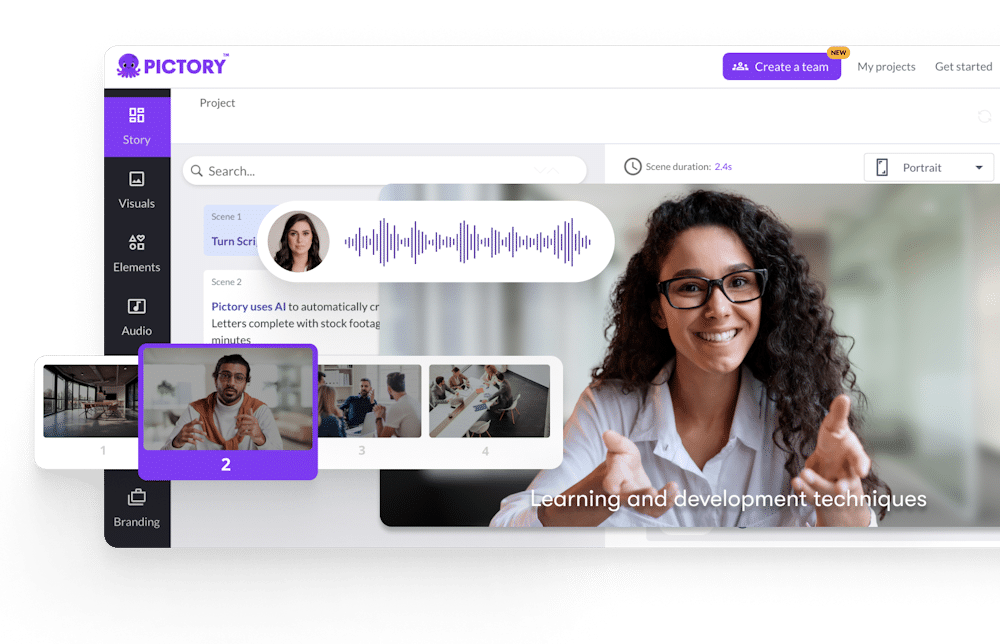
Pictory’s AI video agent reads the source input, drafts a script if needed, and assigns each line a scene, a visual, a voice and captions. Users review the plan and swap visuals or edit the transcript rather than manipulate a raw timeline. A blog post, PowerPoint deck or podcast recording becomes an editable draft automatically, with stock footage pulled from Getty Images and Storyblocks where no custom clip exists. Brand kits keep logos, fonts and colors consistent across generated videos.

Main Features
AI video agent
Pictory’s AI video agent takes a brief, topic or source file and prepares a script, scene breakdown and preview without manual scene-building. It scripts the narrative first, then matches each line to a visual before handing the draft back for review. This means users start from a usable plan instead of a blank timeline.
Script to video
Pasting a script gives every line in Pictory a scene, a visual, a voice and captions automatically. The tool parses sentence breaks to decide scene timing rather than requiring manual cuts. Writers who already draft scripts for marketing or training content can skip storyboard software, since the breakdown happens on paste.
PPT to video
Pictory imports .pptx files and converts slide decks into narrated video, available on every plan including the free trial. Each slide becomes a scene with voiceover and optional captions layered on top. This lets training and corporate communications teams reuse existing decks instead of rebuilding content in a separate video tool.
Automatic subtitles
Pictory generates captions from audio and exports them as .srt, .vtt or plain text on every tier, including the free trial. Subtitles are produced from the same transcript used for scene matching, so timing stays synced to narration. Teams distributing video across platforms get export-ready caption files without a separate transcription step.
Use Cases
-
Content marketing teams
A content marketing team producing blog posts regularly can run each article through Pictory’s URL-to-video and text-to-video workflows to get a branded draft. This reduces manual video assembly for teams that already publish written content at volume.
-
Webinar and podcast teams
A team processing recorded webinars or podcast episodes can use Pictory’s audio-to-video workflow to extract short highlight clips for social distribution. They turn long recordings into multiple shareable pieces without re-editing raw audio by hand.
-
Internal communications or training teams
A training team generating video minutes within the Teams plan can combine PPT-to-video with narrated presentations and screen recordings. They enhance training materials with captions and shared editing across a multi-user account.
Best For / Not For
Pictory is built for teams and institutions that already produce written, slide or audio content and need it repackaged as video without a dedicated editor.
Three personas fit this directly: content marketing teams turning articles into branded clips, webinar and podcast teams cutting long recordings into shareable segments, and internal communications or training teams narrating slide decks for onboarding.
Pictory does not publicly document integrations with third-party software, and AI-selected visuals can be generic or mismatched with a script, requiring manual correction — teams needing frame-accurate color grading or audio mixing should look at a dedicated desktop editor instead.
Pricing
Pictory’s standard paid plan starts at $25 per user/month billed annually for the Starter tier, with a free trial offering 300 credits and up to 10 minutes of video.
| Plan | Price | Included |
|---|---|---|
| Free trial | Free | 300 credits, up to 10 mins |
| Starter | $25 / user/month, billed annually | 24,000 credits, up to 360 mins/yr |
| Professional | $35 / user/month, billed annually | 72,000 credits, up to 1,080 mins/yr |
| Teams | $119 / user/month, billed annually | 216,000 credits, up to 3,600 mins/yr |
Monthly billing runs higher than the annual rates above, and credits are a shared pool across all AI features, so heavy image or avatar use draws down the same allocation as video minutes.
Pricing checked 2026-10-24.
Quick Comparison
Faceless Reels AI is Pictory’s main alternative for short-form social video automation. Faceless Reels AI focuses on generating and posting faceless short clips directly to social platforms on a schedule. Pictory instead builds scene-by-scene drafts from scripts, URLs, PowerPoint files and audio, with brand kits for team-produced content. Choose Faceless Reels AI for automated daily social posting without a review step. Choose Pictory to repurpose existing blog, slide or recording content into branded, editable video.
Verdict
Pictory converts scripts, URLs, PowerPoint files and audio into scene-by-scene video drafts starting at $25 per user/month for 360 minutes a year. It fits teams and institutions repurposing existing written or recorded content rather than filming new footage. It remains template-based, not a frame-level editing suite.