
AI Email Writing Assistant for Office Workers with MailMaestro
An office worker facing fifty unread emails each morning needs quick, polished replies before the next meeting. MailMaestro, a AI Writing Assistants tool, drafts three reply options from one short instruction and summarizes entire threads into a ready response. MailMaestro does not replace manual review before sending messages.
- United States 22.7%
- India 7%
- Brazil 6.6%
- United Kingdom 6.6%
- Other 57.1%
What MailMaestro Does
MailMaestro is an AI email assistant that drafts, summarizes, and organizes Outlook and Gmail messages for office workers. MailMaestro turns a short instruction into three ready-to-send drafts, condenses long threads into a brief summary with suggested replies, and applies auto labels, auto drafts, and auto follow-ups so messages get sorted without manual effort.
MailMaestro installs as an Outlook add-in and a Gmail Chrome extension, placing drafting and summary tools next to the inbox instead of switching to a separate browser tab, keeping replies, summaries, and follow-ups inside the same window used for daily email work.


Main Features
AI Email Writer
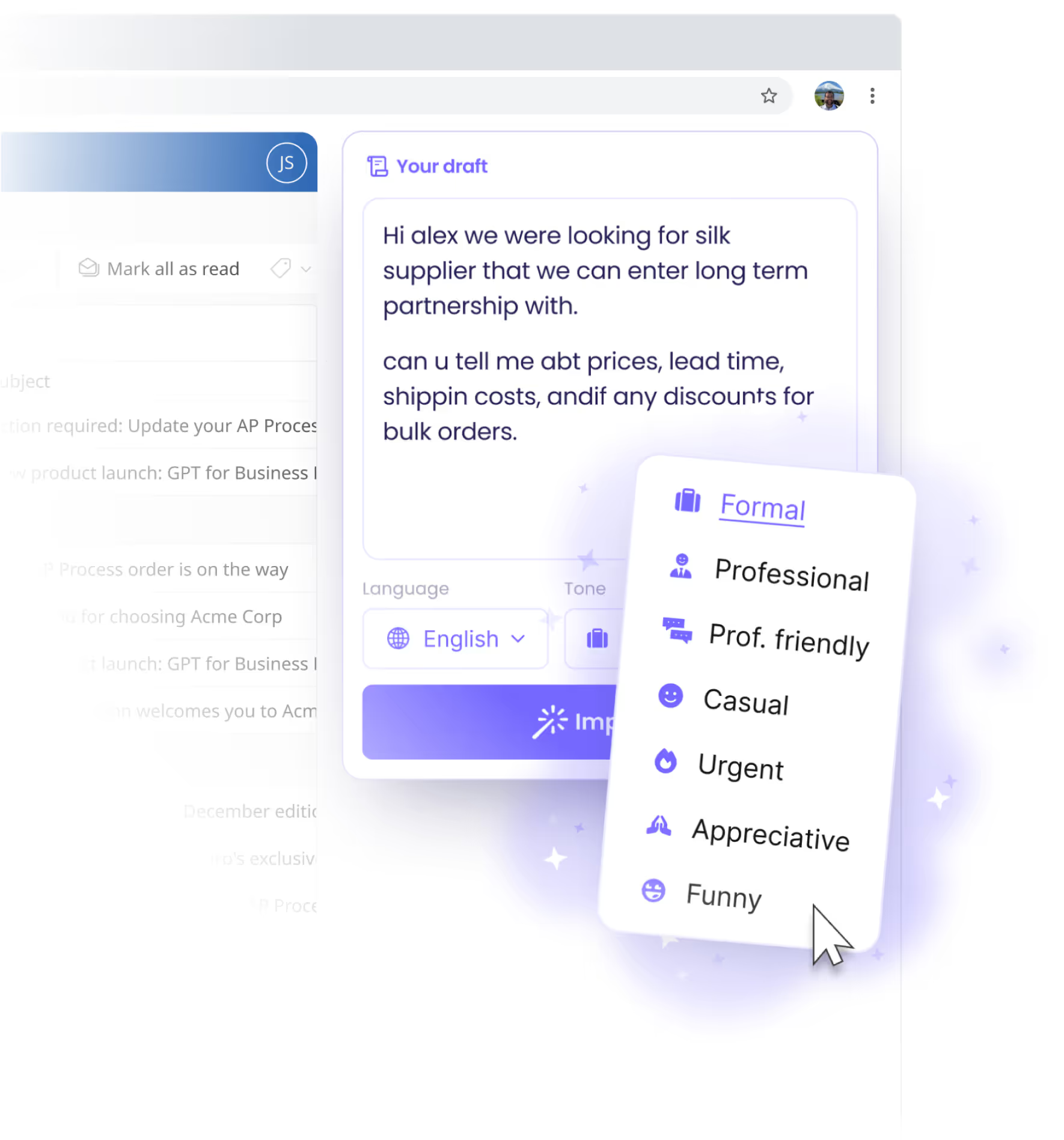
MailMaestro’s AI email writer turns a short instruction into three complete draft emails, built on models from ChatGPT, Claude, and other providers. Users pick a tone, add a prompt, and MailMaestro returns ready drafts. The free plan caps this at three AI requests per week, so regular writers need the Pro tier to compose without hitting that limit.
AI Email Summary
MailMaestro’s AI email summary condenses an entire thread into a short digest and generates several response options to choose from, instead of making users scroll through every message. On Pro, this covers unlimited threads and even summarizes email attachments inside Outlook. It saves the step of re-reading long back-and-forth chains before replying each time a thread grows.
Auto Labels, Auto Drafts & Auto Follow-ups
MailMaestro runs three AI agents on Pro: Auto Labels sorts incoming mail into categories automatically, Auto Drafts prepares a reply before a message is even opened, and Auto Follow-ups writes a nudge when a recipient has not responded. Each agent works in the background inside Outlook or Gmail, so the inbox is pre-sorted and partly pre-answered before the user checks it.
Integrations
MailMaestro works inside Outlook on Windows, Mac, and the web, and as a Chrome extension for Gmail, with no separate desktop app to install. The same account also connects to TeamsMaestro for meeting notes across Teams, Zoom, and Meet. Keeping drafting, summaries, and meeting notes under one login limits setup to adding an add-in rather than configuring multiple separate tools.
Use Cases
-
Email Management
Office workers managing a full inbox use MailMaestro to draft, improve, and summarize messages without switching tools. The AI email writer and AI email summary cut down time spent composing and re-reading threads, while auto labels keep the inbox organized.
-
Meeting Notes
Office workers who sit in back-to-back calls use TeamsMaestro, MailMaestro’s companion app, to turn messy meeting conversations into clear next steps. Notes and transcripts are captured automatically across Teams, Zoom, and Meet calls.
-
High-Volume Email Handling
Sales representatives handling dozens of inbound and outbound emails daily use MailMaestro to draft personalized replies and summarize prospect threads. Auto follow-ups flag conversations that went quiet, so unanswered prospects do not fall through the inbox unnoticed.
Best For / Not For
MailMaestro is built for office workers who write and manage email inside Outlook or Gmail every day. This includes sales representatives answering a high volume of prospect messages, executives tracking dozens of weekly threads, and customer-support agents sending similar replies on repeat. It is not built for teams that need a full replacement email client: MailMaestro adds AI drafting, summaries, and auto labels on top of Outlook or Gmail rather than replacing them, and the free plan’s limit of three AI requests per week makes it impractical for anyone emailing daily without upgrading to Pro.
Pricing
MailMaestro offers a free plan at no cost and a Pro plan priced at $12 per user per month when billed annually, with an Enterprise tier available at custom pricing for larger organizations.
| Plan | Price | Included |
|---|---|---|
| Free | Free | 3 AI requests per week |
| Pro | $12 / user/month, billed annually | Unlimited AI requests |
The table does not show that the free plan’s three weekly AI requests reset every week rather than accumulating, so unused allowance is lost.
Pricing checked 2026-10-25.
Quick Comparison
Anyword is MailMaestro’s main alternative for AI-generated marketing and sales copy across channels. Anyword scores predicted performance for ad copy and landing pages using its own Performance Prediction model, which MailMaestro does not offer. MailMaestro integrates directly into Outlook and Gmail inboxes with auto labels, auto drafts, and auto follow-ups, keeping replies inside daily email instead of a separate app. Choose Anyword if the job is producing and scoring marketing copy for multiple channels. Choose MailMaestro if the job is drafting, summarizing, and organizing daily inbox email.
Verdict
MailMaestro drafts three replies from one instruction, summarizes threads, and runs auto labels, drafts, and follow-ups at $12/seat/month on Pro, or free with 3 AI requests weekly. It suits daily Outlook and Gmail users over teams wanting a full email client.


