ThinkDiffusion for Fashion: Cloud AI Image Generation Workspaces
ThinkDiffusion is a AI Image Generators platform that runs Stable Diffusion, ComfyUI, and Flux in dedicated cloud GPU workspaces. Fashion professionals, including FITNYC collaborators, use ThinkDiffusion to explore AI-assisted design concepts without installing GPU software locally. ThinkDiffusion handles preinstalled open-source apps and persistent storage well, while custom production rendering pipelines still need a general-purpose GPU provider.
- United States 22.4%
- Ukraine 11.8%
- Germany 7.9%
- Russia 5.4%
- Other 52.6%
What ThinkDiffusion Does
ThinkDiffusion turns a text prompt or uploaded model into a rendered image or video by launching a dedicated browser-based GPU machine preloaded with open-source generation apps.
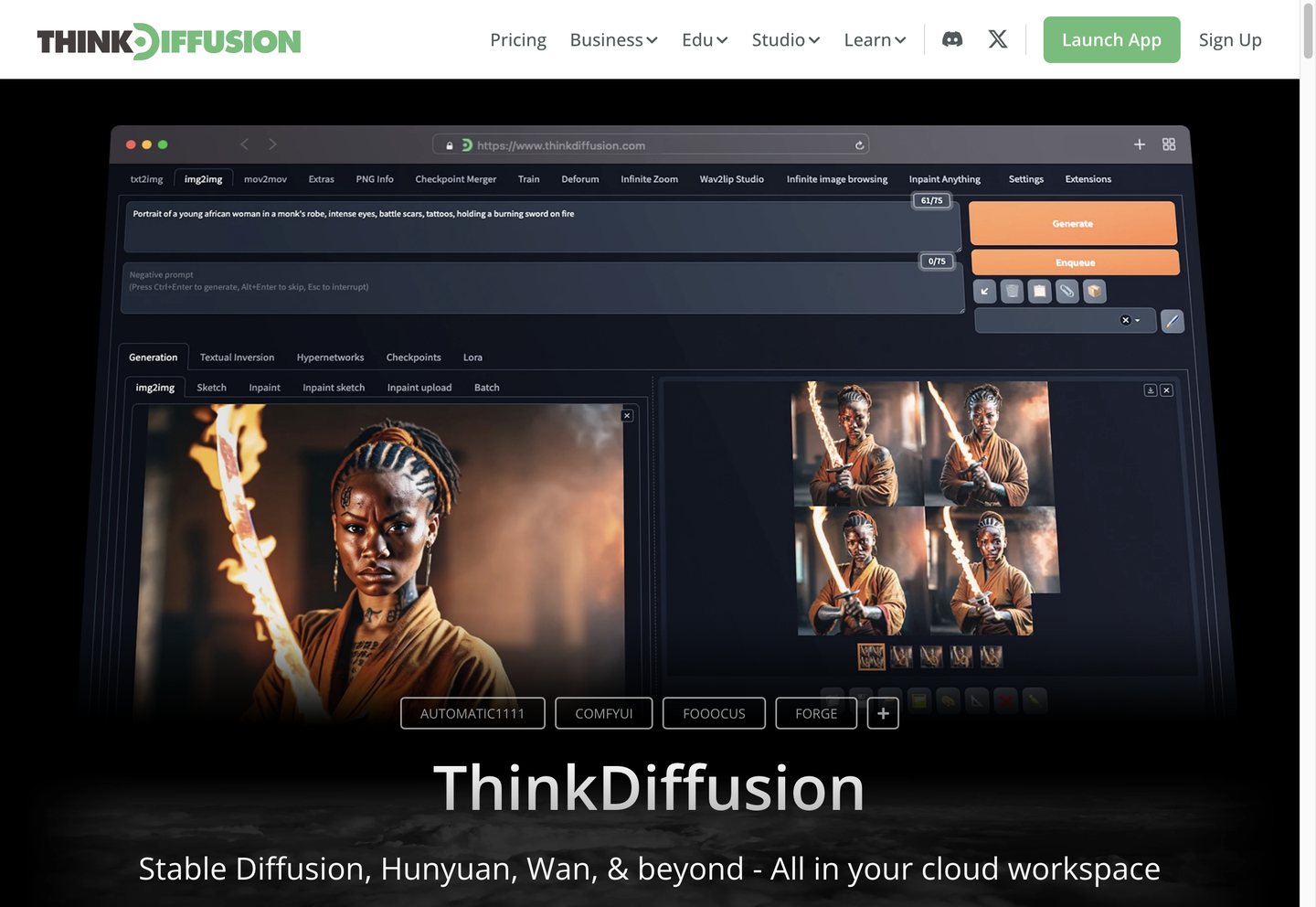
Users pick an application such as Automatic1111, ComfyUI, Fooocus, Forge, or Kohya, then upload or select a model via one-click URL from Civitai or drag-and-drop, running it on a private GPU without configuring drivers or dependencies. ThinkDiffusion stores files, extensions, and settings in a persistent workspace so a session can be resumed later. Billing runs hourly by machine tier, separate from any subscription.
Main Features
Dedicated GPUs
ThinkDiffusion assigns each active machine a single-user GPU across three tiers: Quick (16GB VRAM), Turbo (24GB), and Ultra (48GB). Because the GPU is not shared, rendering and training jobs are not interrupted by other users’ workloads, which matters for longer batch generations or LoRA training runs that would otherwise queue on shared infrastructure.
Preinstalled Applications
Automatic1111, ComfyUI, Fooocus, Forge, and Kohya come preloaded on launch, along with extensions like ControlNet, ADetailer, and AnimateDiff. This removes manual dependency installation, so a user can open a workspace and start generating within the 90 seconds ThinkDiffusion advertises for setup, rather than configuring a local Python environment.
Persistent Storage
Files, models, extensions, and custom settings remain in the workspace between sessions, with capacity ranging from 10GB on Hobby to 200GB on TD-PRO and TD-TEAMS. The Hobby plan includes 48-hour persistent storage with file access while a machine is active, giving free users a bounded window to pick work back up.
Private Workspaces
Each machine and its files are restricted to the account that created them; nothing is shared publicly by default. Any model, extension, or custom node can be installed without a subscription, so a designer testing an unreleased checkpoint keeps that work out of any shared or public gallery.
Use Cases
-
AI & Fashion Collide
Fashion programs like FITNYC bring design briefs into ThinkDiffusion to test generative concepts. Private GPU workspaces and one-click model uploads let students iterate on looks without local hardware. Work stays in the student’s own persistent workspace between sessions.
-
Transform Architectural Workflows
Architecture teams such as Laurel use ThinkDiffusion’s ComfyUI and Automatic1111 setups to generate design variations from reference inputs. Persistent storage keeps project files and custom extensions in place across sessions, so recurring workflows do not need to be rebuilt each time.
-
Photoshoot Challenge Solution
Advertising teams, as with DeoVR’s MetaQuest 3 campaign, use ThinkDiffusion to generate visual assets when a physical photoshoot is impractical. Multiple machines can run simultaneously, letting a team explore several visual directions in parallel.
Best For / Not For
ThinkDiffusion is built for people who want to run open-source generation tools without managing local GPU hardware or software.
Fashion professionals testing design concepts, Architecture teams generating design variations, and Advertising teams producing campaign visuals are the audiences ThinkDiffusion’s published case studies name.
ThinkDiffusion charges machine time hourly in addition to some subscription fees, so teams running long batch jobs daily may find costs harder to predict than a flat-rate tool, and anyone needing general-purpose cloud infrastructure beyond image and video generation should look elsewhere.
Pricing
ThinkDiffusion’s Hobby plan is free with pay-as-you-go machine hours, while TD-PRO costs $19.99 per user/month billed annually ($29.99 month-to-month), and TD-TEAMS costs $59.99 per user/month.
| Plan | Price | Included |
|---|---|---|
| Hobby | Free | 15 minutes free with every sign-up, 10 GB of private drive capacity |
| TD-PRO | $19.99 / user/month, billed annually | All features in Hobby + $10 monthly balance credit, massive persistent storage, hourly rate discounts |
| TD-TEAMS | $59.99 / user/month | Includes 2 team members and a 200 GB default Teams workspace, plus 20% discounted machine rates |
GPU machine time is billed hourly on top of any subscription, with rates varying by tier and discounts applying to TD-PRO and TD-TEAMS members.
Pricing checked 2026-10-23.
Quick Comparison
Nano Banana 2 AI is ThinkDiffusion’s main alternative for teams wanting a hosted image generator without managing GPU machines. Nano Banana 2 AI runs generation directly in its own interface with no hourly machine billing to track. ThinkDiffusion wins on open-source flexibility, letting users install any model, extension, or custom node via Civitai or Hugging Face uploads. Choose Nano Banana 2 AI if a team wants a simpler, flat generation experience. Choose ThinkDiffusion if a team needs specific open-source apps like ComfyUI or Kohya with full model control.
Verdict
ThinkDiffusion runs Stable Diffusion and ComfyUI on dedicated GPUs starting free with 10 GB storage, scaling to $59.99 per user/month for team workspaces. It suits fashion, architecture, and advertising teams generating visuals without local GPU setup.