
Mureka for Independent Musicians: AI Song and Vocal Generation
Most AI Music Generators tools stop at a finished track; Mureka adds timeline editing, stem separation, and track extension afterward. Independent musicians get a draft they can rework, not a locked file. Built for layered editing — casual hobbyists wanting one-click output will find it over-engineered.
- United States 16.4%
- Japan 7%
- Brazil 6.1%
- South Korea 5.7%
- Other 64.8%
What Mureka Does
Independent musicians, content creators, and audio-production teams use Mureka to turn text prompts or lyrics into full songs, then edit the result inside the same workspace.
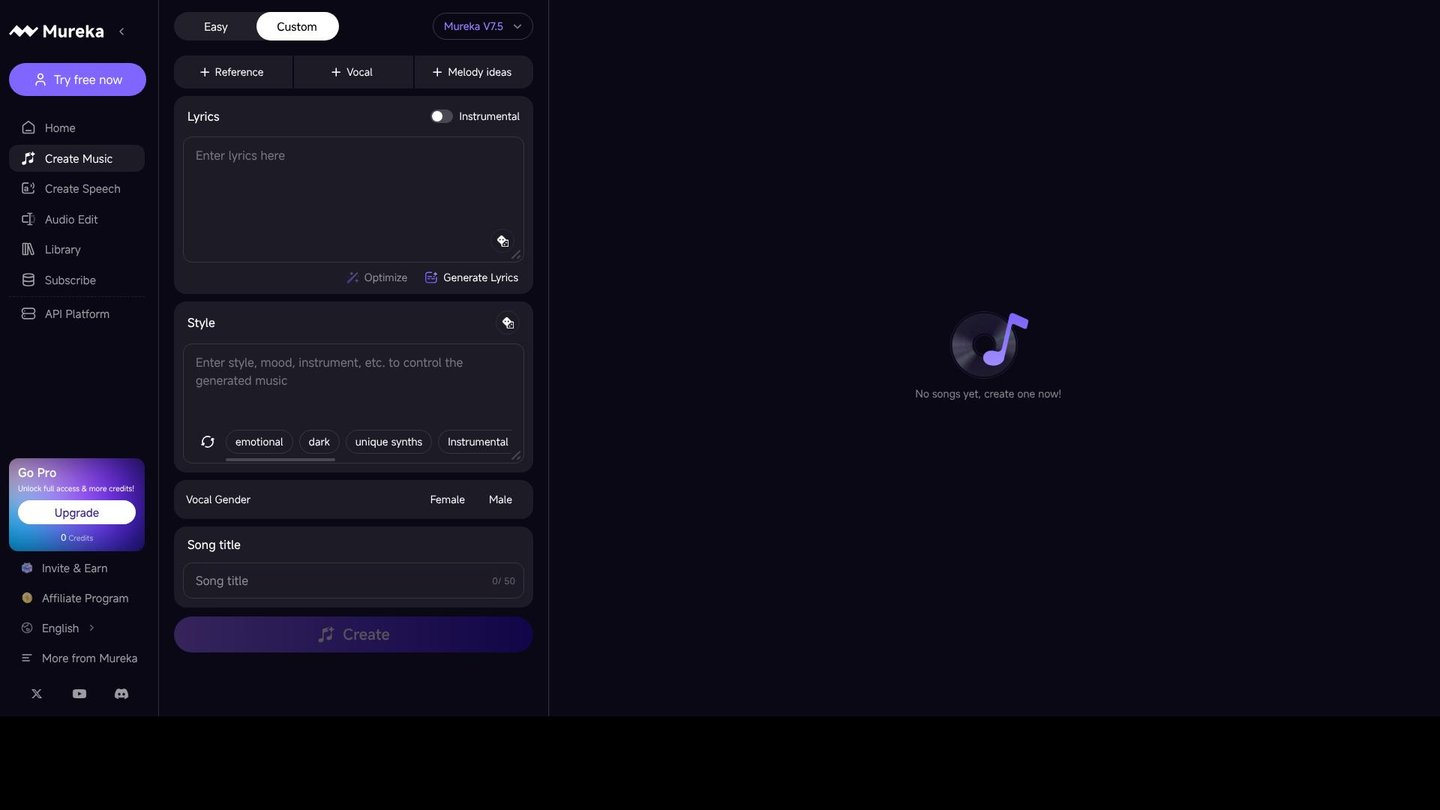
Mureka converts natural-language descriptions like “upbeat” or “atmospheric” into musical parameters, generating melody, harmony, and instrumentation in one pass, then separates vocals and instruments into stems and extends arrangements, turning a first draft into material for further editing rather than a finished export. Text-to-speech output and a Studio workspace with a sound Library sit in the same account, so editing, remixing, and exporting happen without switching to separate software.
Main Features
Text-to-Music Generation
Mureka converts a written prompt or a set of lyrics into a full composition, interpreting descriptive terms and applying them to tempo, instrumentation, and emotional tone. The system analyzes melody, harmony, and sound effects to build the arrangement, so a user without music theory training can produce a usable draft from a single sentence of description instead of starting from a blank project.
Stem Separation
Mureka isolates vocals, instruments, and other elements into individual stems, with up to 12-stem splitting available on higher-tier plans. This lets audio-production teams remix a section, replace a single instrument, or remaster a track without regenerating the whole song from scratch, keeping edits isolated to the parts that actually need changing rather than requiring the entire mix to be regenerated each time.
Music Editing and Track Extension
Mureka edits timelines, sections, and arrangements after a song is generated, and can extend an existing track or add further musical sections. Musicians working on a half-finished idea can lengthen a chorus or rework a bridge instead of discarding the draft and starting over, which keeps a promising take in the project rather than abandoned and rebuilt from nothing.
Voice and Vocal Generation
Mureka generates vocals from text or accepts uploaded voice references, with humming input supported on eligible plans. Content teams can match a vocal style to a brand or character without hiring a singer, though output quality still depends on the reference material provided, which means stronger source audio produces a cleaner final result in Studio.
Use Cases
-
Independent musicians creating drafts
A solo artist uses Mureka to generate multiple song drafts and extend arrangements that show promise. Instrumental or stem exports then move into further editing outside the platform, keeping the workflow iterative rather than one-shot.
-
Content creators producing videos
A team producing dozens of short videos uses Mureka to create custom background music and visuals in-house. This removes the step of commissioning each track externally, which matters when video volume is high and turnaround is short.
-
Audio-production teams remixing tracks
A team processing 10 or more songs uses Mureka to separate vocals and instruments and remix individual sections. Exported stems then feed into further editing, which keeps the remix pipeline inside one tool instead of several.
Best For / Not For
Mureka is built for people who treat a generated song as a starting point rather than a finished deliverable, since editing and remixing happen inside the same account.
That includes Independent musicians drafting and extending song ideas, Content creators and video teams needing custom background music at volume, and Audio-production teams remixing and stem-splitting existing tracks across multiple projects.
Mureka restricts Mureka Studio, MIDI/WAV export, advanced voice features, and 12-stem splitting to higher-tier plans, so musicians needing those tools on a tight budget will hit a paywall before reaching professional-grade output.
Pricing
Mureka offers a free tier with limited daily credits, and its first paid plan, Basic Music & Speech, costs $96 per user per year billed annually for up to 400 songs or 200 minutes of speech monthly.
| Plan | Price | Included |
|---|---|---|
| Free | Free | Basic features for music and video creation |
| Basic Music & Speech | $96 / user/year, billed annually | Up to 400 songs or 200 minutes of speech monthly |
| Pro | $288 / user/year, billed annually | Up to 1,600 songs or 800 minutes of speech monthly |
The free plan does not include commercial licensing, and a higher-tier Premier plan with Studio access and 12-stem splitting exists outside this table at an unconfirmed price.
Pricing checked 2026-10-25.
Quick Comparison
Neume is Mureka’s main alternative for text-to-song generation aimed at non-musicians. Neume focuses on producing complete tracks with lyrics, vocals, and mixing in a simplified workflow for beginners. Mureka wins on post-production depth, offering stem separation with up to 12-stem splitting and track extension for reworking drafts. Choose Neume if you want a finished song with minimal editing afterward. Choose Mureka if you need to remix, extend, or stem-split tracks after generation.
Verdict
Mureka generates songs from text prompts and splits stems up to 12 tracks on higher plans, pairing generation with remixing in one workspace. Basic Music & Speech costs $96 per user yearly, fitting musicians who rework drafts rather than generate once.