
AI Video Generators for Filmmakers with Kling 4.0
Most AI Video Generators tools require separate steps for animation and audio; Kling 4.0 pairs motion control with synced audio in one generation pass. Filmmakers get finished clips without a separate audio step, so Kling 4.0 fits early drafts. Built for short clips — long-form editors will hit its ceiling fast.
What Kling 4.0 Does
Filmmakers, marketing teams, and social creators use Kling 4.0 to turn text prompts or still images into short video clips with controllable camera motion.
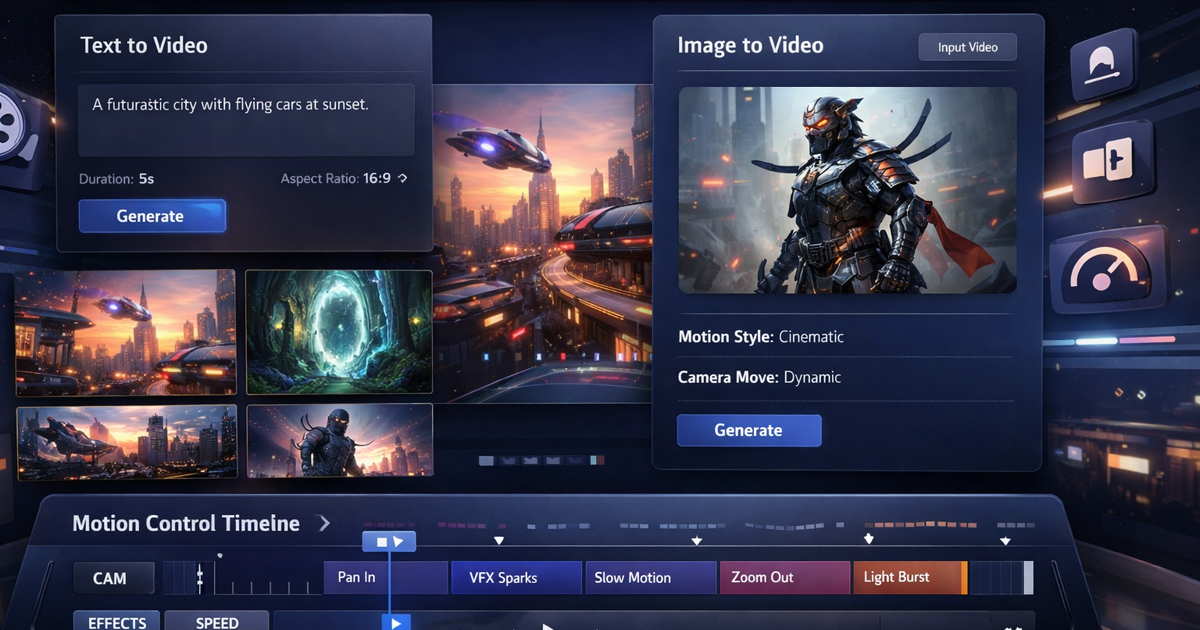
Kling 4.0 accepts a written prompt or uploaded photo and applies motion control to set camera angle, object movement, and scene dynamics before rendering. Output arrives in native 1080p with synced audio, so a clip is ready to publish without a separate audio pass. Commercial video licensing is included on paid tiers for use outside personal projects. The free tier offers the same engine at lower resolution for testing prompts before subscribing.
Main Features
Text to Video Generation
Kling 4.0 converts a written prompt into a short video clip by interpreting scene, subject, and action described in natural language. The model builds motion and composition from the text alone, without a reference image. This removes the need for storyboarding software before a first draft exists.
Image to Video Conversion
Kling 4.0 animates a still photo into a moving clip by generating motion, transitions, and camera movement around the source image. Because the starting frame is fixed, subject likeness and composition stay consistent across the generated sequence. This suits product shots or portraits where the original image must remain recognizable.
Motion Control Technology
Kling 4.0 lets users set camera angle, object movement, and scene dynamics directly, rather than relying on the model’s default interpretation of a prompt. Adjusting these parameters changes how the final render moves without rewriting the prompt. Creators get repeatable control over pacing instead of regenerating clips until one looks right.
Native 1080p & Audio Sync
Kling 4.0 renders at native 1080p resolution and adds synchronized audio in the same generation step. Because audio is aligned automatically, clips do not need a separate audio-editing pass before publishing. This shortens the path from prompt to a shareable file, though resolution stops at 1080p rather than 4K.
Use Cases
-
Cinematic videos
Filmmakers and content creators bring a text prompt or reference image and need professional-grade scene composition. Kling 4.0’s motion control and 1080p output handle camera movement and resolution. The result is a short cinematic clip usable in a rough edit without external motion tools.
-
Anime videos
Animators and anime fans supply a prompt describing character and style and want stylized motion rather than photorealism. Kling 4.0’s text-to-video generation applies the requested style options directly. Output is a short anime-style clip ready for style review before further animation work.
-
Commercial content
Marketing teams and businesses need promotional clips cleared for external use. Kling 4.0’s commercial video license covers this use case on paid plans. Marketing teams generate campaign assets without negotiating separate usage rights per clip.
Best For / Not For
Kling 4.0 is built for people generating short, prompt-driven video clips rather than editing full productions. Kling 4.0 serves Filmmakers and content creators, Marketing teams and businesses, and Social media creators producing promo clips, drafts, or UGC-style content on a recurring schedule. These users need fast turnaround more than frame-level editing control. Solo creators without dedicated editors also benefit, since Kling 4.0 delivers synced audio and motion in a single generation step. Kling 4.0 caps output at native 1080p on its listed plans, so studios needing 4K deliverables or multi-scene long-form editing should look elsewhere for that stage of production.
Pricing
Kling 4.0’s standard entry plan, Starter, costs $9.9 per user per month billed annually, unlocking 7200 credits per year, with two higher tiers scaling credits and generation speed.
| Plan | Price | Included |
|---|---|---|
| Starter | $9.9 / user/month, billed annually | 7200 credits/year |
| Annual Plan | $14.9 / user/month, billed annually | 15000 credits/year |
| Advanced | $44.9 / user/month, billed annually | 54000 credits/year |
The Annual Plan tier, priced at $14.9 per user per month billed annually, adds faster generation speed and 15000 credits per year for creators publishing more frequently, roughly enough for 150 videos across the year. The table does not show what happens once yearly credits run out mid-cycle or whether unused credits roll over to the next year. Kling 4.0 also runs a launch promotion offering 50% off annual plans, so the discounted rate shown may differ from the standard price listed here once the promotion ends.
Pricing checked 2026-09-30.
Quick Comparison
TryH3 is Kling 4.0’s main alternative for credit-based short clip generation with synced audio. TryH3 focuses on rendering short MiniMax H3 clips built specifically for content teams and studios. Kling 4.0 differentiates with motion control over camera angle and object movement plus a commercial video license on paid tiers. Choose TryH3 if a studio already standardizes on MiniMax H3 output. Choose Kling 4.0 if the priority is direct motion control and licensed commercial use of the clips.
Verdict
Kling 4.0 generates 1080p clips with synced audio and motion control for filmmakers and marketing teams starting at $9.9 per user per month. It fits short-form, prompt-driven production rather than long-form editing pipelines. Studios needing 4K output will need a different tool for that stage.