
A Paraphraser for Students and Content Teams with Paraphrasing Tool
Paraphrasing Tool is a Paraphraser that rewrites sentences and paragraphs into alternate wording while keeping the original meaning. Students use Paraphrasing Tool to rephrase complex research material before submitting essays. It handles short passages well, while long-form document review still needs a human editor.
- Indonesia 73.5%
- United States 4.4%
- Poland 1.6%
- Vietnam 1.6%
- Other 19%
What Paraphrasing Tool Does
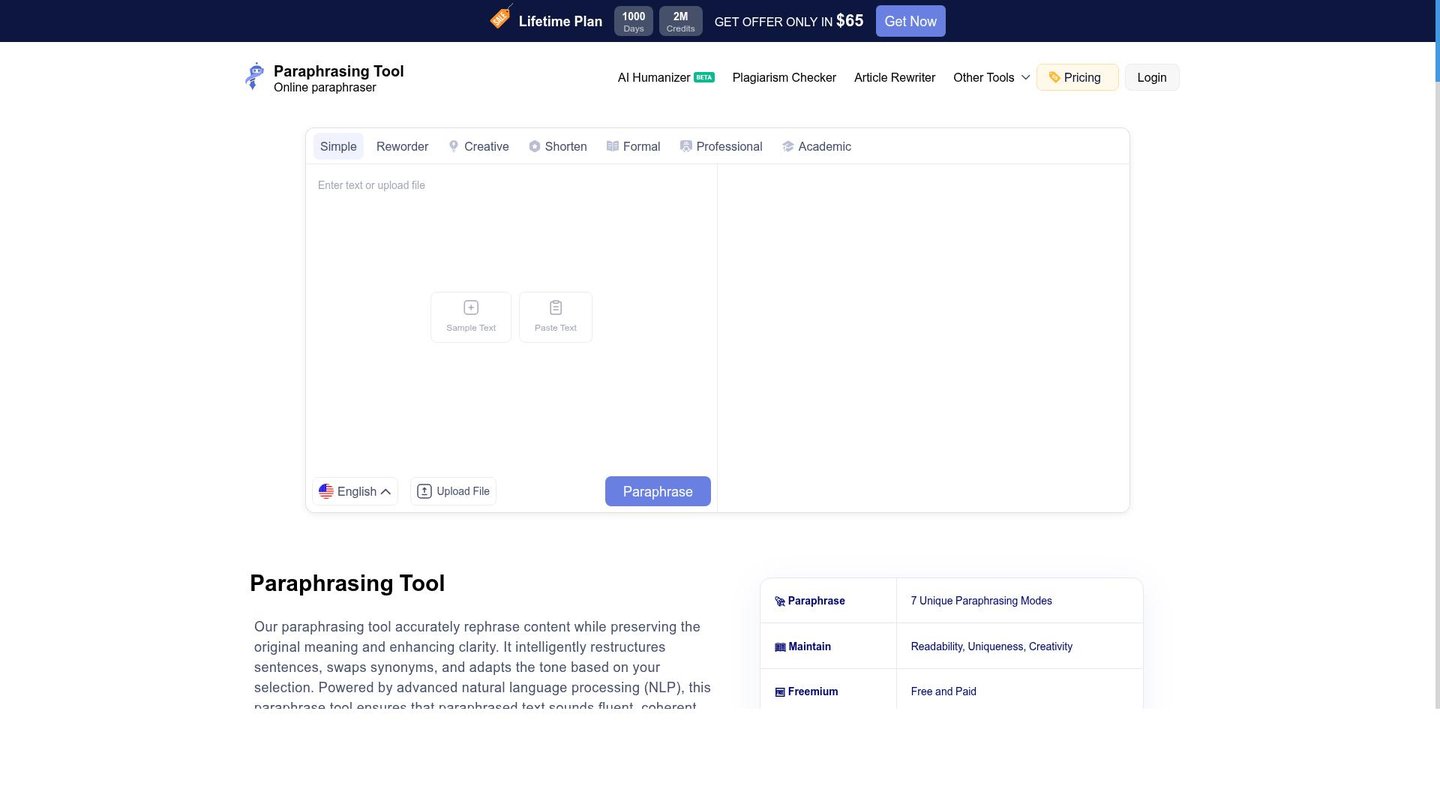
Paraphrasing Tool turns pasted sentences, paragraphs, or essays into reworded text by running them through one of seven writing-style modes.
Users paste source text, pick a mode such as Formal, Academic, or Creative, and Paraphrasing Tool generates an alternate version that keeps the meaning intact. This addresses repetitive phrasing, awkward tone, and overly similar wording flagged during editing. Output runs through the same account as the plagiarism checker, AI content detector, AI humanizer, and text summarizer, sharing one word-credit pool across rewriting and verification. Credits are consumed per word, at different rates per tool.
Main Features
Multiple Paraphrasing Modes
Paraphrasing Tool offers seven writing-style modes, including Simple, Reworder, Creative, Shorten, Formal, Professional, and Academic. Each mode applies a different sentence-construction pattern to the same input text. Switching modes on one passage produces distinct outputs for different contexts, so a single paragraph can be adapted for an academic submission or a casual blog draft without rewriting it twice.
Accurate Performance
Paraphrasing Tool applies AI and large-language-model algorithms to rephrase text while tracking the original meaning. The system replaces word choices and restructures sentence order rather than swapping isolated synonyms. This reduces the chance of meaning drift that simple word-substitution tools produce, though users should still review output on technical or legal text for accuracy.
Multiple Languages Support
Paraphrasing Tool processes text in 18 languages, including English, Spanish, French, German, Italian, and Indonesian. Users select a language before submitting text, and the rewriting engine applies mode-based rules within that language. This lets non-English content creators and multilingual teams reuse the same tool instead of licensing separate language-specific software.
No Ads/Captcha
Paid plans remove ads and CAPTCHA prompts during paraphrasing sessions, a feature listed across every Basic, Pro, and Lifetime tier. Removing the captcha step shortens the per-submission workflow for users processing many short passages in sequence, such as editors working through a batch of documents.
Use Cases
-
Students writing essays
Students rephrase complex research material into their own words before submitting assignments. Paraphrasing Tool’s Academic and Formal modes adjust tone and reduce repetitive wording across a 500-word passage. The free tier covers short assignments; longer essays require more credits.
-
Content and marketing teams
Content teams producing multiple blog posts a month use Paraphrasing Tool alongside the article rewriter and text summarizer to create alternative drafts from source material. This enhances clarity and uniqueness across drafts without starting each piece from a blank page.
-
SEO content optimization
SEO Executives run content through Paraphrasing Tool’s AI content detector to remove patterns flagged as AI-generated before publishing. The combined rewriting and detection workflow makes text more search-engine friendly, since flagged passages get reworded rather than discarded.
Best For / Not For
Paraphrasing Tool is built for people who rewrite short to medium-length text regularly rather than manage large document pipelines across an organization.
Students rephrasing research notes before submission, Content Writers producing alternate drafts from source material, and SEO Executives clearing AI-detection flags from published pages are the core audiences named in its own feature set. Copywriters drafting marketing copy also fall within the documented target users.
Paraphrasing Tool is not built for teams needing bulk document processing with no credit ceiling: every plan, including Lifetime at 2,000,000 credits, runs on a fixed word-credit pool that depletes with use.
Pricing
Paraphrasing Tool offers a Free Register Plan with limited credits, and its standard paid entry point is the Basic Monthly plan at $5 per user/month, billed monthly, for 200,000 credits.
| Plan | Price | Included |
|---|---|---|
| Free Register Plan | Free | Basic features with limited credits |
| Basic Monthly | $5 / user/month, billed monthly | 200,000 Credits |
| Pro Monthly | $8 / user/month, billed monthly | 300,000 Credits |
| Basic Yearly | $48 / user/year, billed annually | 1,000,000 Credits |
| Pro Yearly | $58 / user/year, billed annually | 1,500,000 Credits |
| Lifetime Plan | $65 / one-time | 2,000,000 Credits |
The table does not show what happens once monthly credits run out mid-cycle; the paraphrasing, article rewriter, and summarizer tools each draw from the same shared credit pool at different per-word rates.
Pricing checked 2026-10-26.
Quick Comparison
WordAi is Paraphrasing Tool’s main alternative for automated article spinning at scale. WordAi applies deep-learning rewriting focused on bulk article variation for SEO content networks. Paraphrasing Tool bundles a plagiarism checker, AI content detector, and humanizer in the same credit pool as its paraphrasing modes. Choose WordAi if the priority is high-volume automated article spinning for multiple sites. Choose Paraphrasing Tool if the workflow needs rewriting plus detection and plagiarism checks in one account.
Verdict
Paraphrasing Tool processes 200,000 words of credit on its $5 Basic Monthly plan across paraphrasing, plagiarism checking, and AI detection for students and content teams. Its seven writing modes and 18-language support fit short-to-medium rewriting tasks rather than high-volume content pipelines.


