Descript: Video Editing for Marketing Teams
Which video tool lets marketing teams cut footage by editing a transcript instead of a timeline? Descript, a Video Editing tool, edits video and audio by rewriting the generated text for marketing teams. Educators or podcasters needing deep multitrack remote recording should weigh their workflow against Descript’s metered media hours first.
- United States 38.7%
- India 7.7%
- United Kingdom 7.6%
- Philippines 4.4%
- Other 41.7%
What Descript Does
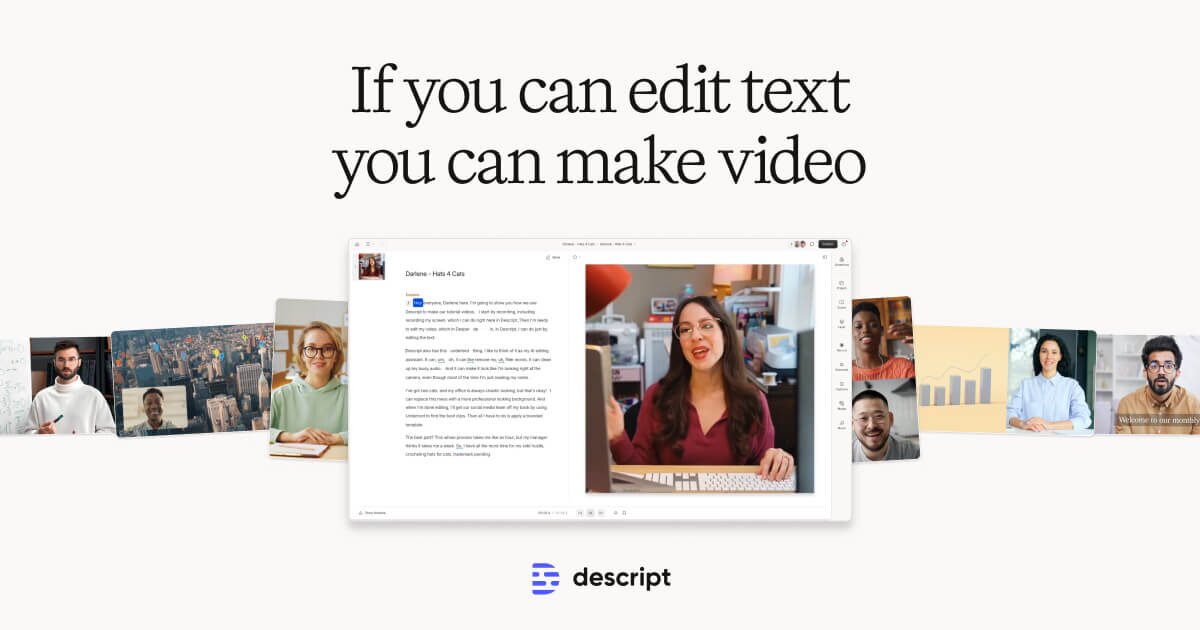
Descript turns a recorded video or audio file into an editable transcript, then applies text edits back onto the media itself.
Cutting a sentence from the transcript cuts the matching clip from the timeline, so marketing teams and educators do not need frame-by-frame scrubbing to trim a webinar or a product demo. Descript adds Studio Sound to clean up background noise, an AI co-editor called Underlord to assist with assembling footage, and Translation and dubbing to localize video into more than 30 languages on eligible plans. Projects stay inside one application from recording through export, removing the handoff between separate transcription, audio, and video tools.
Main Features
Text-based Editing
Descript generates a transcript on import, and deleting, moving, or retyping words in that transcript edits the underlying audio or video track in the same places. This removes the need to locate matching timecodes manually, so a marketing editor can tighten a product demo by reading it like a document instead of scrubbing a timeline.
Underlord AI Co-editor
Underlord is Descript’s AI assistant, built to help turn a raw recording into a tighter cut by acting on instructions inside the editor. It can also be reached through Descript’s API and MCP support, so editing steps can be scripted or triggered from another application instead of done by hand each time.
Studio Sound
Studio Sound applies AI-powered background-noise removal to a recording, producing clearer, more consistent audio from a clip recorded in an untreated room or over a laptop mic. Since this runs on the existing track rather than requiring a re-record, teams can salvage webinar or interview audio captured without studio equipment.
Translation and Dubbing
Descript translates and dubs video into more than 30 languages on Business and Enterprise plans, with proofread output rather than raw machine translation only. A marketing team repurposing one interview into multiple regional versions can export each language from the same source project instead of re-editing per market.
Use Cases
-
Marketing Videos
Marketing teams record a product launch or feature release and use Descript’s text-based editing and Studio Sound to clean up a draft cut quickly. The transcript-driven workflow lets a non-editor trim and reorder scenes without timeline training.
-
Educational Videos
Educators use Descript’s text-based editing to assemble deep dives into complex topics, cutting tangents and restructuring explanations by rewriting the script rather than re-recording. This keeps instructional material concise without multiple reshoot sessions.
-
Podcasts
Content creators record, transcribe, edit, and publish podcasts inside Descript without switching tools between stages. Multitrack transcription and Studio Sound handle speaker labeling and audio cleanup, which keeps the episode pipeline in one project file.
Best For / Not For
Descript is built for people who edit spoken-word video or audio and would rather work in text than a timeline.
Marketing teams, educators, content creators, and YouTubers are the audiences named in Descript’s own materials, covering product demos, instructional videos, podcasts, and metadata-ready uploads.
Descript meters media hours and AI credits separately by plan, which makes usage cost harder to predict for teams running long or frequent recordings, and it is optimized for spoken-word content rather than cinematic or complex visual editing.
Pricing
Descript offers a Free plan at $0, with paid tiers starting at $16 per user/month, billed annually, for the Hobbyist plan.
| Plan | Price | Included |
|---|---|---|
| Free | Free | |
| Hobbyist | $16 / user/month, billed annually | 10 media hours / month, 400 AI credits / month |
| Creator | $24 / user/month, billed annually | 30 media hours / month, 800 AI credits / month |
| Business | $50 / user/month, billed annually | 40 media hours / month, 1500 AI credits / month |
Media hours and AI credits run on separate meters, so a project that exhausts one allowance before the other can still require a top-up purchase mid-month.
Pricing checked 2026-11-13.
Quick Comparison
ChatCut is Descript’s main alternative for teams that want a chat-driven interface over a traditional editor layout. ChatCut focuses its workflow around conversational prompts to direct edits. Descript wins on breadth, pairing text-based editing with Studio Sound, Underlord, and multi-language dubbing in one app. Choose ChatCut if a prompt-first editing style fits the team better. Choose Descript if the project needs transcription, audio cleanup, and translation handled inside a single workflow.
Verdict
Descript processes recordings into editable transcripts and exports watermark-free 1080p video starting at $16 per user/month on the Hobbyist plan. It fits marketing teams, educators, and podcasters who want transcription, cleanup, and editing in one app rather than a dedicated multicam studio.