AI Image Description Tool for Web Developers with ImageDescriber
ImageDescriber is a Image Editing tool that converts uploaded images into text: descriptions, alt text, OCR output and prompts. Web developers and accessibility teams use ImageDescriber to generate WCAG-compliant alt text for site image libraries. It handles single-image analysis and batch runs well, while nuanced product context still needs a human editor.
- United States 35.6%
- United Kingdom 10.4%
- India 6.9%
- Netherlands 5.9%
- Other 41.1%
What ImageDescriber Does
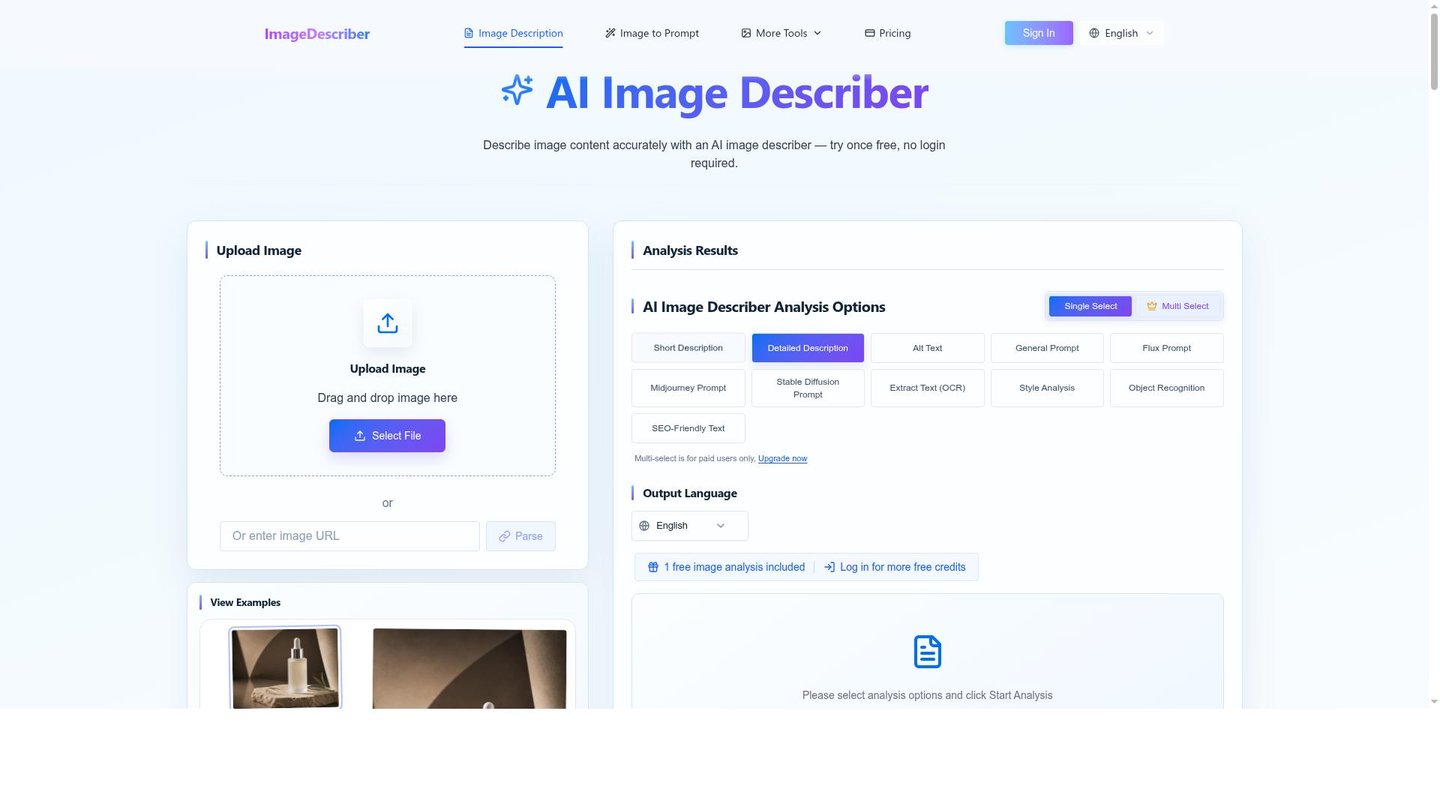
ImageDescriber reads an uploaded image and returns text output selected from description, alt text, OCR or image-generation prompts, charged per output type.
Users drag an image into the upload box, pick one or more output types, and ImageDescriber runs the analysis through its model pipeline before returning results that can be copied or downloaded. Free accounts are limited to one output per image, while paid accounts can select several outputs at once, including a model fallback option for paid analysis. The batch tool processes up to 100 images per run, with results exportable as CSV, TXT or JSON for use in a CMS, spreadsheet or publishing workflow.
Main Features
Image Description
ImageDescriber generates short or detailed written descriptions of an uploaded photo by analyzing its visual content and producing natural-language text. Selecting no output defaults to a Detailed Description. This gives writers and marketers a starting draft instead of a blank caption field, though factual accuracy on ambiguous images still needs review.
Alt Text & WCAG Compliance
ImageDescriber produces alt text aimed at WCAG compliance, with concise, detailed or decorative phrasing options for different image roles. Each output type costs one credit per image. This lets accessibility teams batch-generate draft alt text for an entire image library before a manual accuracy pass.
Image to Prompt
ImageDescriber converts an existing image into a text prompt formatted for tools like Midjourney, Stable Diffusion and Flux. The conversion runs as a separate selectable output alongside description and alt text. This gives artists a starting point for regenerating or varying a reference image without manually reverse-engineering its style in words.
Batch Processing & Export
ImageDescriber processes up to 100 images per batch, capped at 20MB per file and 200MB total, running each image sequentially and billing by its selected output count. Completed batches export as CSV, TXT or JSON. This fits catalog-sized jobs, but the per-file and total-size caps rule out very large single uploads.
Use Cases
-
Accessibility & WCAG Compliance
Web developers and accessibility teams need alt text across large image libraries. ImageDescriber generates WCAG-compliant alt text in concise, detailed or decorative form per image. Teams still review output before publishing to confirm accuracy.
-
E-commerce Product Descriptions
E-commerce teams and online retailers upload product photos needing catalog copy. ImageDescriber creates product image descriptions and alt text through its batch tool, exporting results as CSV. This improves SEO coverage and customer-facing copy at catalog scale.
-
AI Image Prompt Generation
AI artists and prompt engineers hold a reference image and want a reusable prompt. ImageDescriber converts the image into a prompt compatible with Midjourney, Stable Diffusion and Flux. This gives them a text starting point instead of guessing wording by hand.
Best For / Not For
ImageDescriber is built for people who need text generated from images repeatedly, at a scale beyond manual captioning or one-off edits.
Web developers and accessibility teams generating WCAG alt text across large libraries, e-commerce teams and online retailers batch-processing product catalogs, bloggers and content writers captioning article images, and AI artists and prompt engineers reverse-engineering prompts all fit the workflow.
ImageDescriber does not include team workspaces, SDKs, webhooks or a contractual uptime SLA, so engineering teams needing automated pipeline integrations beyond the basic API key endpoint should look elsewhere.
Pricing
ImageDescriber’s Free Plan costs $0, and paid credit packs start at $4.99 one-time for 100 credits.
| Plan | Price | Included |
|---|---|---|
| Free Plan | Free | 1 guest analysis without login, 5 credits on signup, 3 daily claimable credits |
| 100 Credits Pack | $4.99 / one-time | 100 credits |
| 300 Credits Pack | $9.99 / one-time | 300 credits |
| 600 Credits Monthly | $9.99 / user/month, billed monthly | 600 credits per month |
| 800 Credits Pack | $19.99 / one-time | 800 credits |
| 1500 Credits Pack | $29.99 / one-time | 1500 credits |
| 3000 Credits Monthly | $29.99 / user/month, billed monthly | 3000 credits per month |
| 11000 Credits API Pack | $99.99 / one-time | 11000 credits |
| 25000 Credits API Pack | $199.99 / one-time | 25000 credits |
Pricing checked 2026-10-20.
Quick Comparison
ImageHub is ImageDescriber’s main alternative for general image-processing workflows. ImageHub bundles a broader editing toolset within one catalog listing rather than focusing purely on text output. ImageDescriber concentrates on description, alt text, OCR and prompt generation with batch CSV/JSON export built in. Choose ImageHub if the job needs wider image-editing functions beyond text generation. Choose ImageDescriber if the job is specifically alt text, captions or prompt conversion at batch scale.
Verdict
ImageDescriber processes up to 100 images per batch and charges 1 credit per selected output, starting at $4.99 for 100 credits, for teams producing alt text, descriptions or prompts at volume. It fits accessibility and e-commerce teams more than developers needing SDK-level integration.